

On this page9 sections
A retry loop can look reassuring in a diff: a failed call gets another chance, and the tests still pass. Yet three attempts that each wait two seconds can break a caller’s two-second deadline. This is the kind of question that makes an automated code reviewer interesting. A useful comment connects the code to a behavior someone can test, rather than merely adding another opinion to the pull request.
CodeRabbit reviews proposed code changes, gathers repository context and returns explanations and suggested fixes. Its pull-request integration places that feedback beside changed lines, while editor and command-line tools can examine work earlier. For SRE and platform teams, the potential gain is finding a consequential assumption before a human spends hours reconstructing the change. The CodeRabbit review overview describes these review surfaces.
Adopt it when the findings reduce the total effort required to inspect evidence and accept or reject a change. That criterion includes checking false positives and verifying suggested fixes. Following the retry problem through setup, configuration and a measured pilot makes it easier to judge that gain than counting comments or accepting a bot’s approval as the result.
How a proposed change becomes a review comment
A pull request, or PR, proposes a change to a shared branch. CodeRabbit can summarize it, explain affected files, raise potential defects and suggest patches, with follow-up discussion in the review. Later commits can receive incremental reviews focused on what changed. That keeps the conversation alongside the revision it concerns, as documented in How PR reviews work.
CodeRabbit describes repository exploration, isolated cloud execution, AI models, static analyzers and retained team guidance in its Documented architecture. Static analysis checks code without executing the complete application; AI adds an interpretation of context and intent. Together they may connect a suspicious line to a caller elsewhere in the repository. Neither establishes by itself that the service will behave correctly under production load.
Existing checks still do different work. A linter enforces known code rules, and a test executes behavior someone specified. An AI reviewer can suggest a question neither encoded, such as whether repeated attempts preserve the caller’s deadline. The useful next step is turning that explanation into inspectable evidence, often a test that can run again after the conversation is over.
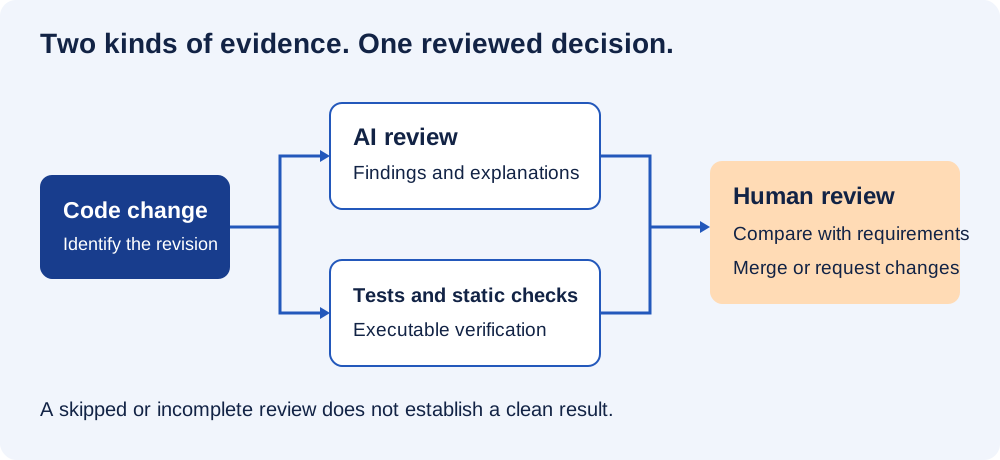
CodeRabbit also documents planning and a cloud Coding Agent, with feature-specific availability and billing. Those capabilities are outside this review trial: permission to examine a change does not implicitly authorize implementing one. The CodeRabbit Coding Agent covers that separate product surface.
Where earlier feedback can save a review round
If the author investigates the retry finding before requesting human review, the next reviewer can see the failing path and checked correction together. That can avoid a later round of questions, particularly across time zones. A generated summary can help them orient themselves, but they still need the actual diff and any important files it omits.
Repository instructions give this first pass context it cannot infer reliably: the caller’s deadline, migration compatibility and whether a write may be repeated. Generated code can carry a plausible but wrong assumption, and a second AI pass can share it. Turn a discovered requirement into an executable test or enforced check where possible, so it survives beyond the review conversation.
What the published review studies measured
The vendor-published freee case study describes the accounting-software company starting with about 30 users and a roughly month-long trial before expanding to 570 seats. CodeRabbit reports 48.5% overall suggestion acceptance and 32.8 weeks of reviewer time saved across six months. Those are the case study’s results, not measurements reproduced for this guide.
The transferable detail is how the work was divided. Authors handled initial suggestions before humans reviewed architecture and intent. That suggests a workflow worth trying, without making the reported savings a forecast for another team with different repositories and review habits.
A July 2026 arXiv preprint by Hong Yi Lin and colleagues supplies a different perspective: among 31,073 review-and-feedback pairs across 239 GitHub repositories, it classified 36.4% as accepted, 7.3% as discussion and 56.3% as rejected. Developer response is not a universal bug-detection score. Its definitions and population differ from freee’s case, so the percentages cannot establish a trend between the two.
Start with a repository whose review process already works
Choose one actively maintained repository with working tests. Installation requires suitable permission or an organization administrator’s approval. Preserve required human review and branch protection during the trial; these give the new feedback a stable acceptance process to contribute to.
- Connect the account. Use the official quickstart, choose GitHub and follow its installation flow.
- Limit the initial repository selection. Read the permissions shown and enroll the pilot repository before considering a wider rollout.
- Open a small non-draft PR. Initially target the default branch and explain intended behavior, changed behavior and the tests already run.
- Inspect the reviewed revision. Confirm the commit and files, then ask for a failing input or execution path when a finding lacks one.
- Verify the correction before human review. Understand a suggestion, apply it if warranted and check the new revision with the required tests.
For GitLab, Azure DevOps or Bitbucket, follow Supported platform setup. Installation permissions and feature support can differ, so a GitHub trial is not evidence that another provider exposes the same controls.
After the first response, use PR comments to choose the next review scope. The distinction between incremental and complete review becomes useful when a small correction does not justify re-examining the entire proposal:
| Comment | Purpose |
|---|---|
@coderabbitai review | Review incremental changes. |
@coderabbitai full review | Request a fresh review of the complete PR. |
@coderabbitai pause | Pause automatic reviews while making several changes. |
@coderabbitai resume | Resume automatic reviews. |
Both review commands use an allowance when a review runs. After a small change, the incremental request is usually the focused option; if a comment is unclear, clarification may be more valuable than another full pass. One concrete request is @coderabbitai Show the input and execution path that make this fail, and identify any assumptions about the caller. The command reference describes these controls.
Turn repository expectations into specific review questions
A root-level .coderabbit.yaml can carry those expectations through the normal code-review process. Before using this illustrative configuration, replace its path patterns with the client and migration paths in your repository. It asks for balanced feedback and visible review details while focusing those files on particular failure paths:
language: en-US
reviews:
  profile: chill
  review_details: true
  request_changes_workflow: false
  auto_review:
    enabled: true
    drafts: false
  path_instructions:
    - path: "src/clients/**"
      instructions: |
        Check timeout propagation, bounded retries, and retry safety.
        Explain a concrete failure path for each proposed defect.
        Ask whether write retries require an idempotency key.
    - path: "migrations/**"
      instructions: |
        Check compatibility with the previous application version.
        Identify destructive changes and possible long-held locks.
        State when table size or traffic information is missing.
The chill profile is balanced, quiet lowers feedback volume, and assertive increases it. Keeping request_changes_workflow disabled avoids switching on that feature’s automatic approval behavior. These settings shape AI review, while Git-provider protections continue to govern the repository. The Configuration reference defines their behavior.
A path instruction changes how a file is reviewed; a path filter excludes it. A migration can consequently remain in GitHub’s diff while disappearing from the AI walkthrough. Check that distinction before interpreting a clean review as coverage. Dependency and infrastructure checks in CI still need to address risks in excluded files. Path instructions and filters
A few concrete questions are more useful than a general request to be careful. “Can this retried write execute twice?” identifies something to investigate. Start there, then adjust instructions after several PRs reveal genuinely missing context or repeated noise. The goal is relevant evidence, not the longest instruction file.
Use local review when it removes a later interruption
The CLI can inspect work before a branch is published. Follow the official installation instructions for the operating system; the documented Homebrew command on macOS is brew install coderabbit. After authenticating in the appropriate region, run the review from the Git repository:
cr auth login
# For an EU-hosted account, use: cr auth login --region eu
cr auth status
cr review --uncommitted
# Include new files that have not yet been staged:
cr review --uncommitted --include-untracked
The short command name is cr. Despite running from a terminal, the workflow uses CodeRabbit’s service rather than performing offline analysis. The same organizational permission to process the code externally is therefore needed as for another review surface.
The CLI offers cr config validate to validate YAML and cr doctor to diagnose startup problems. When it runs, inspect coverage as well as completion: unstaged new files require the additional flag shown above. Automation must read exit status and completion details, including files that were not reviewed, before recording success. The CLI reference and completion semantics explains those semantics.
An IDE extension offers another early-feedback location. Pick the surface that fits the pilot and keep the PR conversation for collaboration. Running every available surface repeatedly may add duplicate comments and waiting without covering another meaningful risk.
Return to the two-second deadline
In this hypothetical example, a developer adds a loop with three attempts to a client call. The caller expects the operation to finish within two seconds, while each attempt is allowed to wait two seconds. The code looks like a reliability improvement until the total wait is considered:
# Illustrative flawed retry loop, not production code.
for attempt in range(3):
    try:
        return client.fetch(timeout=2.0)
    except TimeoutError:
        if attempt == 2:
            raise
If every attempt consumes exactly its configured timeout, this simplified loop can wait six seconds. A per-attempt limit has failed to preserve the caller’s total deadline. Real libraries differ in what their timeouts include, so the actual client behavior needs inspection and measurement; the arithmetic identifies the question rather than supplying a production test result.
Useful feedback would connect the two-second caller expectation to the three-attempt path and propose a total deadline. “Add exponential backoff” misses that problem: another delay may make the violation worse. The value of the review is the causal explanation that tells an engineer which behavior to test.
That explanation leads to three related checks:
- Total time: compute each attempt’s timeout from the remaining caller budget, and stop when that budget is exhausted.
- Retry eligibility: determine which failures are safe to repeat, remembering that a timed-out write may already have happened.
- Failure behavior: simulate successive timeouts and verify the number of attempts, total budget and returned error.
This is an example of worthwhile review reasoning, not a finding reported from a CodeRabbit test. When the operation writes state, the guide to reconciling an unknown write explains why the retry decision requires more than choosing a timeout.
Inspect both the failing case and the result of the proposed fix before accepting it. If the failure cannot be reproduced, investigate the assumptions behind the finding. It may expose a real bug, an inaccurate comment or a false positive. Each outcome gives the human a reason to decide, which is more valuable than an unexplained approval.
Seat prices and the cost of reviewing feedback
The pricing page checked on September 29, 2026 listed these USD rates for annual billing. They are monthly equivalents of an annual commitment, not month-to-month subscription prices:
| Plan | Per developer/month, billed annually | Main reason to consider it |
|---|---|---|
| Essentials | $24 | PR and CLI review. |
| Team | $48 | Additional workflow controls and higher limits. |
| Advanced | $72 | Architectural analysis and continuous security monitoring. |
| Enterprise | Custom | Enterprise controls and deployment options. |
Essentials and Team replace Pro and Pro Plus; their month-to-month prices are $30 and $60. The page advertises a 14-day trial and free reviews for qualifying public repositories. Hourly allowances, optional usage-based review and separately billed features still apply, so “unlimited” does not mean unlimited burst capacity or every product in one subscription. Verify the current scope in Current pricing and allowances before buying.
For a hypothetical five-developer Essentials pilot, the annual rate amounts to $120 per month in seat-cost equivalent. Enabled usage charges and time investigating feedback add to that cost. Keep recovered engineering time separate from cash savings: making hours available for other work does not automatically lower payroll.
When the additional reviewer creates more work
| Situation | Better first move |
|---|---|
| Your problem is formatting or a known lint rule. | Automate that deterministic rule in CI. |
| The repository cannot be processed by an external service. | Use approved tools or evaluate a permitted enterprise deployment. |
| Most feedback repeats checks you already trust. | Narrow its role or skip the additional reviewer. |
| The change depends on production capacity or undocumented business behavior. | Bring the relevant measurements and domain expert into review. |
| A critical hotfix is waiting on a rate-limited reviewer. | Follow the existing emergency-change procedure with accountable human review. |
| You want a bot’s approval to replace testing and ownership. | Improve the acceptance process before adding more generated feedback. |
If investigating and correcting CodeRabbit’s feedback costs more effort than resolving the defects it usefully identifies, narrow its role or stop using it in that repository. Include plausible false positives in that accounting. They can consume review time even when the final decision is to change nothing.
Code processing and repository caching
The FAQ says source is not retained after review except with caching enabled. The more detailed caching documentation says caching is on by default, may retain a prepared repository and dependencies for up to seven days, and can be disabled with reviews.disable_cache: true. It describes encryption except for OSS projects and says cached data is not used for training. Read the FAQ alongside the caching documentation to understand the exception rather than stopping at the shorter statement.
Disabling repository caching is not a universal deletion control. Comments, learned guidance, logs, subprocessors and contractual retention may need separate answers. Review the actual installation permissions and agreement when these affect requirements. A no-training statement addresses one use of data; it does not mean that code is never processed by the service.
Measuring the pilot in actual pull requests
Use a bounded first window, perhaps two weeks or 20 representative PRs in the active repository. That is a practical starting point, not a statistically validated sample size. Include routine work and known difficult changes; a demonstration built only from obvious defects makes it too easy to miss the everyday review cost.
Keep a short per-PR record connecting each finding to the revision examined and the human effort it caused:
- The reviewed commit and coverage of the intended files.
- Useful and rejected findings, including why a proposed issue was rejected.
- Time spent investigating AI comments and performing the human review.
- Waiting time, including failed or rate-limited review attempts.
- The test or other evidence used to accept a correction.
Compare similar changes with the established workflow, preserving severity and uncertainty. An accepted variable rename and a reproduced data-loss defect are different outcomes. Neither an acceptance count nor a total comment count can honestly turn every suggestion into a prevented incident.
You can download the CodeRabbit pilot checklist to carry the record into PR templates or team notes. The guide to supervising coding agents with Herdr develops the distinction between visible activity and accepted work, while AI-assisted release engineering covers checks at the release boundary.
The retry example gives the pilot a concrete standard: a useful finding explains why three two-second attempts violate the caller’s total deadline and helps an engineer test a correction. Across ordinary PRs, the same comparison shows whether CodeRabbit catches consequential assumptions early enough to repay the time spent checking its comments. Repeated noise can justify narrower instructions or removing the extra review step.
Sources & context
Sources linked in this article. Read alongside the author’s analysis; a citation does not independently verify a publisher’s claims.
- CodeRabbit review overviewdocs.coderabbit.ai
- Documented architecturedocs.coderabbit.ai
- CodeRabbit Coding Agentdocs.coderabbit.ai
- freee case studywww.coderabbit.ai
- arXiv preprint by Hong Yi Lin and colleaguesarxiv.org
- official quickstartdocs.coderabbit.ai
- command referencedocs.coderabbit.ai
- Configuration referencedocs.coderabbit.ai
- Path instructions and filtersdocs.coderabbit.ai
- official installation instructionsdocs.coderabbit.ai
- CLI reference and completion semanticsdocs.coderabbit.ai
- Current pricing and allowanceswww.coderabbit.ai
- FAQwww.coderabbit.ai
- caching documentationdocs.coderabbit.ai