

On this page6 sections
Kubernetes allows the worker to leave, but the remaining inference pods cannot keep up. During the replacement's model load, users wait. A disruption budget counts available pods; the maintenance plan also needs to account for the requests those pods can finish.
The useful rehearsal follows the requests arriving while that replacement starts. A defined request mix and observation window make the before-and-after comparison meaningful; a stop condition and recovery route keep the rehearsal bounded. The canary guide applies the same test-scope principle; here the change temporarily removes a worker. The resulting service behavior decides whether another maintenance step is reasonable.
An eviction allowance is not a reservation for a replacement GPU
A PodDisruptionBudget, or PDB, limits availability loss for selected pods during planned disruption. The Eviction API checks it. It reserves no replacement hardware and cannot prevent involuntary failure, although such failures count against it. Workload controllers govern rolling updates separately. The disruption model explains these limits.
If host maintenance and rollout overlap, each can follow its own policy while reducing the same capacity. Pause unrelated rollouts for the pilot, identify other maintenance automation and record the exclusion period so the observation describes one change.
Imagine three Ready replicas, each sustaining 20 requests per second within the latency limit, with 50 arriving. A two-pod requirement permits one to leave, but the remaining assumed capacity is 40. Ten requests each second must wait, fail or go elsewhere. These are illustrative rates; real capacity depends on prompts, output and batching. The pod count can be accurate while answering less than the service question.
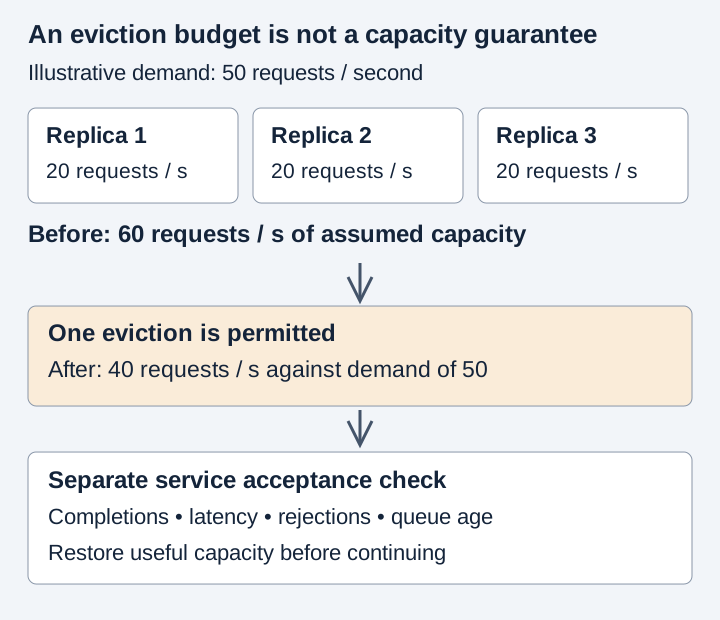
The workload and spare GPU capacity in staging
Those ten requests per second make a good question for staging: how long would they wait before the replacement can help? The staging model size, startup and placement constraints need to resemble the intended service. Synthetic inputs keep customer content out of the rehearsal. Inspection access is not drain authority, so the people observing and authorizing the change must agree the load, latency and rejection ceilings, duration and recovery owner before it begins.
Our arithmetic assumes each replica can answer a request independently. A distributed model may instead split that request among cooperating processes, called ranks; removing one can interrupt the joint work rather than merely subtract one independent server. Training may also hold progress that has not been checkpointed. Those workloads need their coordinated shutdown or checkpoint route when loss is intolerable, not a recovery promise inferred from replica count.
A spare GPU changes the story only if it can actually be obtained in time. Its funding and acquisition delay belong with the trial’s bounded GPU, download, warmup and logging costs. An immediately available staging spare could make those waiting requests look manageable while hiding the delay production would face.
Match the budget to the pods you mean to remove
The manifest assumes an existing three-replica Deployment, app: inference-api, in namespace inference. It permits one unavailable selected replica; it creates or scales nothing. Inspect actual template labels before relying on it:
apiVersion: policy/v1
kind: PodDisruptionBudget
metadata:
  name: inference-api-maintenance
  namespace: inference
spec:
  maxUnavailable: 1
  selector:
    matchLabels:
      app: inference-api
Choose either minAvailable or maxUnavailable. Integers can make small groups easier to reason about; percentages round up. An empty policy/v1 selector matches every pod in the namespace. The PDB guide explains selection and status.
kubectl -n inference get deployment inference-api -o yaml
kubectl -n inference get pods -l app=inference-api -o wide
Save the reviewed file as inference-pdb.yaml. In approved staging, inspect kubectl diff -f inference-pdb.yaml, apply only the intended selection and allowance, then read the live budget before draining:
kubectl -n inference get pdb inference-api-maintenance -o yaml
Compare currentHealthy, desiredHealthy and disruptionsAllowed, checking that status reflects the specification. Zero allowance may reveal unhealthy pods, wrong selection or an unready replacement. Deleting the budget would remove the objection, not create healthy capacity.
Placement and model loading delay the replacement
Suppose there is a free GPU, but the replacement still waits. It may be the wrong GPU type, lack the requested resources or usable storage, or sit outside the required topology. A node’s taints can exclude pods that do not tolerate them; affinity rules can require or prefer particular placement. “Free” and “eligible for this pod” are different claims. The assignment guide explains what scheduling must satisfy.
If two replicas share the drained worker, the PDB can allow the first eviction and block the next until replacement is healthy. That pause may be the policy doing its job while exposing slow recovery.
Once placed, the replacement still has to retrieve its image, load the model and warm up. The ten-request shortfall does not end merely because the container says Running. Separate those intervals from the first useful response, and choose readiness that reflects usable inference without uncontrolled costly probes. The probe guide separates startup, liveness and readiness.
Requests, waiting and rejection during the drain
Keep offering the same workload while the worker leaves, including requests the service may reject. In the illustrative 50-request-per-second case, a graph of only accepted completions could quietly lose the ten requests the survivors cannot finish. Latency, rejection, queue age and Ready replicas show where that work went. Request identity across retries prevents a repeated attempt from looking like a new customer task; generator limits matter too, because a stalled generator can conceal missing service capacity.
After confirming the baseline and target, drain the authorized staging worker, substituting its verified name:
kubectl drain <approved-staging-node> --ignore-daemonsets --timeout=10m
Suppose the command reaches its timeout while the replacement is still loading. The operator cannot read that failure exit as “nothing changed”: an earlier eviction may already have removed capacity. The timeout bounds waiting, not effects already performed. The drain procedure uses graceful eviction and respects the budget, leaving DaemonSet pods. Neither success means completely empty nor failure means unchanged.
--disable-eviction changes to deletion and bypasses the budget. --delete-emptydir-data permits local data loss; --force permits removal without a controller. Read the reference before considering them; each changes the authorized experiment.
Before another worker leaves, the same offered load must show what happened to the shortfall. Did the replacement begin answering, did the queue merely grow, or did rejection rise? A stop condition means stopping further maintenance and preserving scheduling events and service measurements. Those distinguish delayed eviction, placement, startup and insufficient surviving capacity. Rejecting the waiting requests is not service recovery.
Returning a node to scheduling does not undo the drain
If the original worker is healthy and its owner permits return, kubectl uncordon <approved-staging-node> allows new scheduling. It neither returns evicted pods nor reverses updates or moves current pods. Recheck placement and service; use approved replacement if the host remains suspect.
An unhealthy pod blocking eviction may need an explicit policy. Kubernetes recommends considering AlwaysAllow for misbehaving applications. Review it for this version and workload: it exchanges waiting for recovery for permission to evict an unhealthy running pod.
The worksheet keeps selection, baseline, interruption, recovery and next decision together. Promote only exercised conditions. If spare GPUs made the test work but are unavailable in production, resolve that constraint first.
Return to the ten requests the survivors could not finish each second. Put their completions, waits and rejections beside the time from eviction to the replacement's first useful response. The result should show where that work went, or identify the capacity problem before production has to discover it.
Sources & context
Sources linked in this article. Read alongside the author’s analysis; a citation does not independently verify a publisher’s claims.
- Kubernetes disruption modelkubernetes.io
- configuring a PDBkubernetes.io
- node-assignment documentationkubernetes.io
- probe documentationkubernetes.io
- drain procedurekubernetes.io
- command referencekubernetes.io