

On this page5 sections
When someone says a server runs Linux, they may mean the kernel, a complete distribution or the environment inside a container. Those meanings overlap, but they are not interchangeable. Linux history explains why a system can share the same kernel family with another machine while using different commands, libraries, package tools and service configuration.
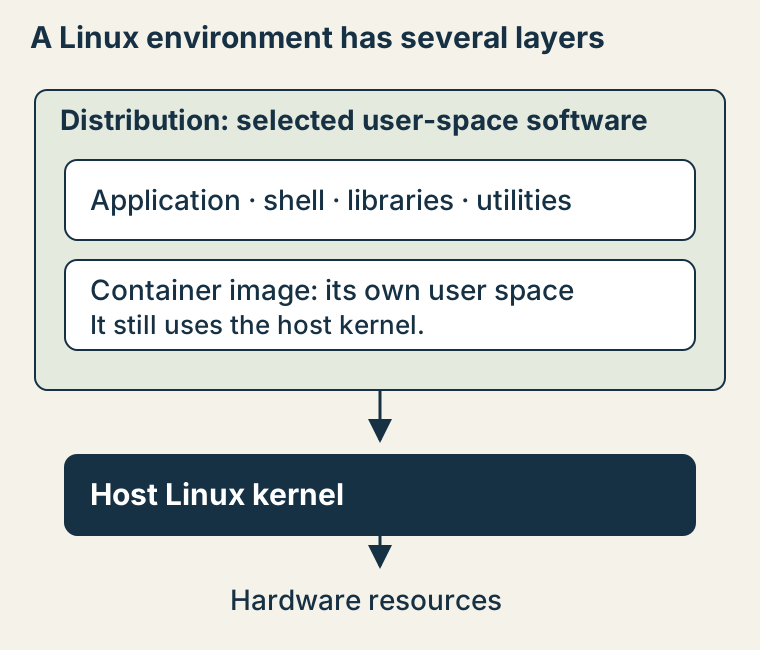
The practical consequence is simple: operating Linux means understanding several independently maintained layers. A kernel release number helps answer a kernel question. It does not, by itself, tell you which package manager or shell is installed. Knowing how those layers came together makes documentation and troubleshooting much easier to navigate.
Unix provides the family resemblance
Unix developed at Bell Labs beginning in 1969. Its influence includes the idea of building useful work from programs that can cooperate, and a system interface organized around processes, files and streams. Linux later implemented a Unix-like system; it is not simply an old Unix source tree renamed.
A shell illustrates the separation. It reads commands and starts programs. The kernel manages the lower-level resources those programs need, such as process scheduling, memory and device access. A command like ls is another program. A familiar terminal screen can hide those boundaries, because the programs cooperate closely enough to feel like one thing.
GNU builds the rest of a system
Richard Stallman's 1983 GNU announcement proposed a free Unix-compatible software system. GNU developed major components including compilers, libraries and utilities. Its project combined a technical goal with software freedoms: the ability to use, study, modify and redistribute software under its licenses.
This work matters to Linux history because a kernel alone is not the whole environment a person installs and uses. Programs need tools to build them, libraries to support them and commands through which people work. Many widely used Linux distributions combine the Linux kernel with GNU components, although other combinations exist.
A kernel becomes a shared project
Linus Torvalds began Linux in 1991 for the x86 PCs available to him. The original 0.01 release notes describe a small i386 kernel and explicitly distinguish the shell, compiler and libraries needed around it. The kernel project's own overview describes Linux as written from scratch, with contributions from people across the network, and distributed under GPL version 2.
The kernel handles resources and exposes interfaces that applications use. Its development became a shared effort across maintainers and contributors. That collaboration is important, but it does not mean every component on a Linux machine comes from the kernel project. A shell defect, a library compatibility problem and a device-driver failure can belong to three different projects.
Distributions assemble these pieces into something people can install, update and support. They choose versions, package software, supply defaults and maintain release policies. That is why instructions that work on one distribution may need a different package name or configuration location on another. The common kernel family does not erase those integration choices.
A container makes the layers visible
Consider a hypothetical application running in a minimal container on a Linux host. The image supplies its application and user-space files, while the running container uses the host's kernel. Installing a package in that image does not replace the host kernel. Rebuilding the host kernel does not automatically add a missing command to the image.
That separation explains a common puzzle: uname -r and /etc/os-release answer different questions. On a Linux environment where they are available, the first reports the kernel release; the second describes the operating-system image or distribution. Inside a container, those answers can legitimately describe different layers of the deployment.
uname -r
cat /etc/os-release
command -v sh
command -v ls
These read-only checks orient the investigation. Their output is specific to your environment; this guide does not invent a sample result or run them against a production host. Minimal images may omit utilities, and an operating system can use alternatives to GNU components. Identify the actual component before choosing documentation or an installation procedure.
Follow the layer that owns the behavior
For the hypothetical missing command, start with the container image and its package choices. For a kernel interface or device driver, inspect the host and kernel support. For a distribution-managed service, use that distribution's supported configuration and update path. The history gives you a reason to make these distinctions instead of treating every Linux symptom as a kernel issue.
You do not need to memorize a family tree before opening a terminal. Begin with this picture of cooperating layers, then use the files, paths and mounts guide to see how a process's view of storage affects a real investigation. Performance tuning belongs later, once you can identify the program, resource and environment whose behavior you want to change.
Sources & context
Sources linked in this article. Read alongside the author’s analysis; a citation does not independently verify a publisher’s claims.
- Unix developed at Bell Labs beginning in 1969www.bell-labs.com
- 1983 GNU announcementwww.gnu.org
- original 0.01 release noteswww.kernel.org
- own overviewwww.kernel.org
- uses the host's kerneldocs.docker.com
- 1983 GNU announcementwww.gnu.org