

On this page5 sections
The status page answers in 80 milliseconds: the report is still pending. That is a fast response to a question the user wishes they no longer had to ask.
To explain the wait, you need to follow the report job as well as the requests around it. A status-request chart can tell you how promptly the API replies, while leaving the minutes spent waiting for a worker completely out of view. This lesson maps those observations onto the work they actually describe.
Continue with Dispatch, the fictional report-export service from lesson 1. That lesson investigated slow status responses for a defined population. Here, the question changes to why one export took so long to become ready. The event packet and identifiers below are illustrative teaching material; you can complete the exercise on paper without installing a telemetry stack.
Several requests surround one job
Dispatch accepts an export and returns its job identifier. The job waits in a queue until a worker takes it, reads the source data, builds the report and stores the result. Later requests ask for status or download the finished file.
Those requests are separate from the background job. The submission request can finish before processing starts, and a status request can succeed while the job is still waiting. “Pending” can be an accurate answer from a healthy status endpoint, even when the delay it reports is unacceptable.
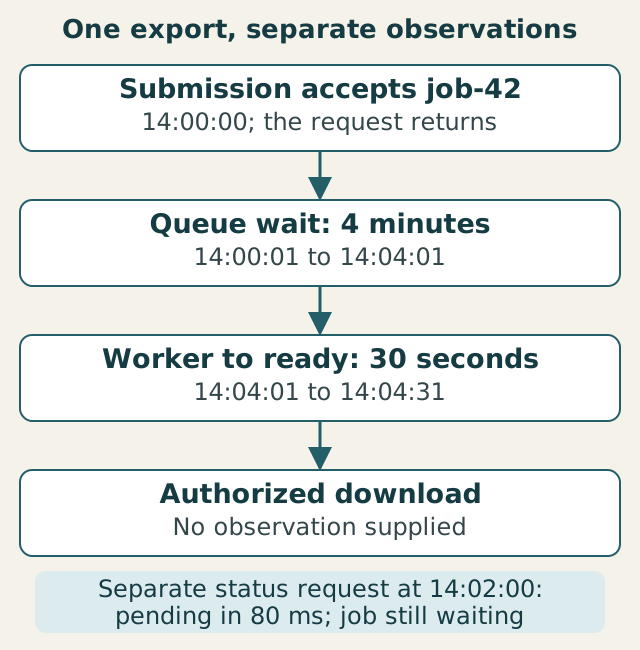
Carry the same export identity, affected population and investigation window across the map. If you move from this user’s job to a service-wide latency chart, check what the chart includes before treating it as an explanation. A fast response for another operation or account cannot tell you where this export spent its time.
Where did job-42 spend its time?
Start with the supplied records for job-42. The timestamps use UTC on the same fictional day. Assume aligned clocks for this arithmetic; comparisons between real hosts need to account for clock uncertainty.
| Observation for job-42 | Time or duration |
|---|---|
| Export accepted | 14:00:00 |
| Job enqueued | 14:00:01 |
| Worker started job | 14:04:01 |
| Report marked ready | 14:04:31 |
| A separate status request returned “pending” | 14:02:00; request duration 80 ms |
| Successful download by the intended user | No observation supplied |
There is one second from acceptance to enqueue, four minutes from enqueue to worker start and 30 seconds from worker start to ready. Together, they account for four minutes and 31 seconds from acceptance to ready. The fast status request happened in the middle of the queue wait.
The four-minute wait is the first interval to investigate. A shortage of available workers, a burst of incoming jobs or a scheduling constraint could each produce it; the timestamps locate the delay without choosing among those explanations. The 30-second worker stage is elapsed time, too. It may include waiting for reads and writes rather than 30 seconds of computation.
Ask for queue history and worker availability around the wait, retaining the connection to this job. If there were idle workers, investigate whether the job was eligible to run or assigned to the queue they consume. If workers were occupied, inspect what occupied them. These are alternative next checks, not facts supplied by this packet.
The ready event leaves a different question unanswered: could the intended user obtain the correct report? Keep the observation gap separate from the measured ready time rather than filling it with an assumption that the user’s operation succeeded.
Turn the gap into an observation plan
You can now draw the service’s work and mark what the packet establishes. A second layer identifies the observations you would need in a running service:
| Stage | Question | Useful evidence |
|---|---|---|
| Acceptance | Which export started, and when? | An acceptance record with job identity and timestamp. |
| Queue | How long did this export wait? | Enqueue and worker-start times for the same job. |
| Worker | Where did processing time go? | Events or spans for the attempt’s source reads, computation and output writes. |
| Ready result | When was this output marked available? | A ready-state record linked to the job and output. |
| Download | Could the intended user retrieve the right file? | An authorized retrieval result or a suitable synthetic check. |
For the supplied packet, acceptance, enqueue, start and ready times are available. Processing detail and successful retrieval are missing. Marking those two gaps gives the instrumentation work a purpose: distinguish time inside the worker and verify the final access path. Drawing a box labeled “tracing” would not establish either.
The identifiers must survive the handoff
Related timestamps are easier to interpret when you know they describe the same work. A minimal illustrative record sequence could look like this:
14:00:00 export.accepted job=job-42 request=req-17
14:04:01 worker.started  job=job-42 attempt=attempt-1
14:04:31 export.ready    job=job-42 attempt=attempt-1
job-42 connects the export across requests and background processing. req-17 locates its submission request, while attempt-1 identifies this processing attempt. A retry might create another attempt for the same export, so dropping the attempt identity could mix the start of one attempt with the finish of another.
Trace context serves a related purpose: instrumentation can carry execution context across process and network boundaries so that spans and other signals can be connected. OpenTelemetry’s context-propagation documentation explains that mechanism. Recording a job ID alone does not create a distributed trace, and a trace ID does not replace the export identifier the application uses to track durable work.
For now, annotate which records need the same job and attempt identifiers. You do not have to install instrumentation to identify a broken connection in the plan, such as worker events that cannot be linked back to the accepted export.
Make the next check follow the evidence
Draw the submission request, queue, worker and ready state for job-42. Add status and download as separate requests. Label the supplied times, mark the missing observations and write the first check you would request from someone operating the service.
Compare with a worked investigation note
Job-42 took 271 seconds from acceptance to ready: one second before enqueue, 240 seconds waiting and 30 seconds in the worker stage. The 80-millisecond status response occurred during that wait and does not measure export completion time. Request queue history and worker availability for the same job’s waiting interval before selecting a cause or a scaling change. Request worker-stage detail if the investigation reaches processing, and authorized retrieval evidence if you need to establish the user could obtain the report. Do not use one selected export to calculate the whole service’s delay rate.
The map now explains where this export waited and which questions remain open. When the next lesson introduces metrics, you will have a specific reason to ask for queue-wait measurements, worker-stage timing or download results, and a way to notice when a chart answers a different question.
Sources & context
Sources linked in this article. Read alongside the author’s analysis; a citation does not independently verify a publisher’s claims.
- OpenTelemetry’s context-propagation documentationopentelemetry.io