

On this page6 sections
A dashboard says that requests are completing, while a user says the export page is slow. Both can be true. The dashboard may combine several operations, hide a small affected population or measure a server response that does not include the wait the user experiences.
Observability is the ability to investigate system behavior using the outputs it exposes. Useful telemetry makes that investigation possible: metrics summarize measurements, logs record events and traces connect instrumented operations. Their value depends on whether they describe the operation and population in your question.
For this first lesson, you will investigate a small evidence packet without installing a telemetry stack. Your result will be a supported description of the symptom and a specific next check, rather than a guessed root cause.
Make the question small enough to answer
Dispatch is a fictional service that accepts a report-export request, creates the report in a background worker and lets a user poll its status before downloading it. In this exercise, the user’s complaint is specifically about the status page taking too long to respond. We do not yet know whether the report itself is slow to generate.
Write the investigation question as, “During 15:00 to 15:05 UTC, were status responses slow for tenant A, and which part of a slow request should we inspect next?” A tenant is an account or customer grouping used by the service. Naming it matters because the experience of one group can differ from the overall result.
The question identifies an operation, a time window, a population and a decision the investigation can advance. “Why is Dispatch slow?” leaves all four open. A broad question may be a reasonable starting point, but narrow it as soon as the user report supplies something concrete.
Read the population behind the number
Here is the first piece of constructed evidence. Assume the gateway recorded all 1,200 eligible status requests in the five-minute window, using the same definition of slow for every row. In this exercise, slow means at least two seconds to return a response as measured at that gateway. That threshold is a teaching choice, not a universal performance objective.
| Request population | Recorded requests | Slow responses |
|---|---|---|
| Tenant A | 200 | 100 |
| Other tenants combined | 1,000 | 200 |
| All tenants | 1,200 | 300 |
Half of tenant A’s requests were slow: 100 divided by 200. The other tenants combined had a slow-response fraction of 20%, while the whole service was at 25%. The overall number is correct for its population, but it understates tenant A’s slow-response fraction and does not describe every other tenant individually.
These values are request fractions. They do not say that half of tenant A’s users were affected, because one user can make several requests. They also do not establish that a quarter of the service’s elapsed time was slow. Keeping the unit attached to the number prevents the same count from turning into several unsupported claims.
The gateway measurement also leaves out browser-side work and any request that never reached it. The packet assumes complete gateway coverage, not complete knowledge of the user’s experience. If a real gateway counter has collection gaps, establish those before treating its denominator as complete.
Use a log to find the event, then a trace to inspect its work
The packet includes one log event from a tenant A request. The values are illustrative; no real customer identifiers or payloads are included.
2026-10-19T15:02:10Z
service=dispatch-api
operation=export-status
request_id=example-request-17
trace_id=example-trace-17
tenant=tenant-a
status_code=200
duration_ms=2400
The event helps locate a particular slow request and relates it to a trace. A status code of 200 says the API returned a successful HTTP response in this example. It does not make the 2,400-millisecond duration fast, and it does not establish that the export job was completed.
In a production schema, use the trace identifier format your tracing system specifies. The readable identifiers above are labels for the paper exercise, not OpenTelemetry wire-format examples.
The corresponding simplified trace contains these recorded operations:
| Recorded span | Start relative to request | Duration | Relationship |
|---|---|---|---|
GET /exports/{id}/status | 0 ms | 2,400 ms | The request’s root span. |
read-export-state | 1,800 ms | 400 ms | A child operation inside that request. |
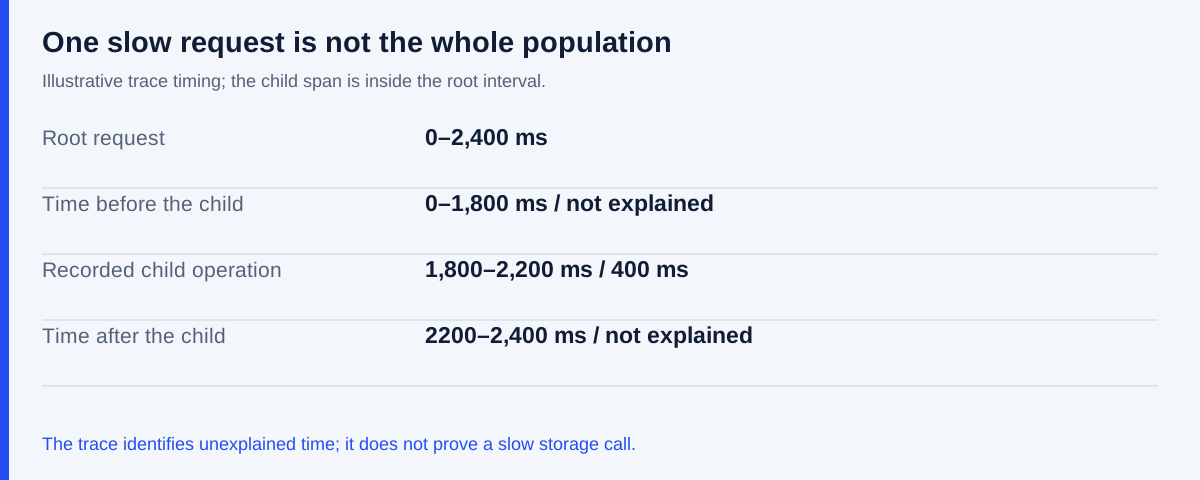
A span records an instrumented operation and its timing. The child ran from 1,800 to 2,200 milliseconds after the request began, within the root’s 2,400-millisecond interval. It accounts for one recorded part of that request. The trace does not explain the 1,800 milliseconds before the child or the 200 milliseconds after it.
The unaccounted time could include waiting, local processing or work that was not instrumented. The trace does not let you choose among those possibilities yet. It also does not show the background export job simply because the endpoint refers to that job; connecting asynchronous work requires suitable instrumentation and relationships.
A useful next check is to compare the handler’s entry time with the time it gains permission to start the state read. A concurrency limit may require a request to wait before proceeding. If a recorded wait occupies most of the unexplained interval, investigate that limit and the work holding its permits. If admission is immediate, the delay is elsewhere in the handler. The current packet supplies neither measurement, so these remain competing possibilities; the lab would need a timing event at those points to distinguish them. Calling the whole 2,400 milliseconds a slow storage call would contradict the timing that is actually recorded.
Correlation gets you to the evidence
The log and trace agree on this one request’s duration, and their shared label lets us inspect the same work. That is useful correlation. It does not establish how many requests followed the same path or prove why tenant A had more slow responses.
Suppose the packet also says this trace was manually selected because it was slow. It is therefore a case to investigate, not a representative sample of all requests. You cannot use it to calculate a service-wide slow fraction; the metric table already supplies the relevant counts. Later lessons cover trace sampling and collection cost, but this distinction matters before choosing any particular tracing product.
Different telemetry answers different parts of the question. The grouped counts show the recorded extent of the symptom. The log identifies a concrete request. The trace shows where that request’s recorded work sits in time. None of those signals alone supplies a complete causal account.
Write the investigation note
Using the packet, write four short entries:
Observed symptom and population:
Evidence supporting that statement:
Explanation not yet established:
Next check and what it would distinguish:
A worked answer could say that 50% of tenant A’s 200 recorded status requests took at least two seconds at the gateway during the stated window. The metric table supports that statement. The selected request took 2,400 milliseconds, of which the recorded child operation occupied 400 milliseconds; the rest remains unexplained by this trace.
The answer should leave the cause and report-generation performance unresolved. Its next check should examine the status handler’s pre-child interval, rather than propose a worker restart from a measurement of a different operation. Another check might be justified if new evidence points elsewhere, but it should identify the question it will answer.
Keep the note with the packet. The next lesson maps the request and background work before adding more telemetry, so each measurement has a defined place in the service you are trying to understand.
Sources and example scope
The distinctions among observability, metrics, logs and traces are introduced in the OpenTelemetry observability primer. OpenTelemetry’s trace documentation explains spans and their relationships. Google’s monitoring chapter discusses user symptoms and system observations. The site’s trace-reading guide develops concurrency, sampling and unexplained intervals in greater depth. All counts, identifiers and timings here are synthetic and were checked for internal consistency. No telemetry platform or production service was exercised.
Sources & context
Sources linked in this article. Read alongside the author’s analysis; a citation does not independently verify a publisher’s claims.
- OpenTelemetry observability primeropentelemetry.io
- OpenTelemetry’s trace documentationopentelemetry.io
- Google’s monitoring chaptersre.google