

On this page5 sections
Updated October 20, 2026. OpenCode 2.0 was publicly announced October 12, following the first v2.0.0 tag on September 11. This guide covers the 2.x generation and installs 2.1.0, released October 20. Launch announcement · 2.0 tag · Changelog
Fixing a stubborn test with AI often involves an undignified amount of copy and paste: code into the chat, suggested changes into the editor, errors back into the chat. OpenCode’s appeal is that it can do that legwork where the project already lives. Give it a request and it can search the project, read the relevant files, propose changes and run commands to check its work.
You also choose the model behind that conversation. OpenCode is the open-source coding agent around the model, with terminal, desktop and web interfaces. The model supplies the reasoning; OpenCode supplies the connection to your working files and tools. That separation gives you room to change providers without rebuilding your entire workflow. OpenCode introduction
For someone maintaining services, the useful jobs are often pleasantly ordinary: explain a brittle deployment script, add a regression test, untangle a configuration change or repair a helper that retries the wrong requests. This guide uses the last example. The goal is to finish with a change you can inspect and test, rather than another impressive-looking answer to copy somewhere else.
What the 2.0 release changes
The most useful change is that the agent can keep several parts of a job moving. OpenCode 2.0 supports background shell commands and background subagents, so a test run or a second model’s review need not monopolize the conversation. For a larger repair, that could mean reviewing a patch while the build finishes, rather than watching one blocking operation at a time.
The release also introduces Code Mode, which lets the agent compose connected tools in JavaScript. It can take a list returned by one tool, select relevant items and pass them to another. That matters for workflows spanning repositories and work trackers, although the first exercise below needs no extra integrations. Official 2.0 release article
Behind the interfaces, 2.x automatically runs a shared background service. Local clients connect to it; it manages sessions, configuration, permissions and tool execution. This explains an otherwise puzzling failure mode: restarting the visible terminal interface may leave the same background problem running. The service has its own diagnostic commands, which we will use below. CLI architecture
Existing users do have migration work to consider. V2 changes plugin and server/client contracts, and moves terminal-interface settings into a single global cli.json file. Supported project configuration can still be read without rewriting everything. Old plugins need actual porting; renaming their entries will not make them compatible. V1 migration guide
The recent 2.0 updates also improve the part of agent work that deserves more attention: seeing what changed. Version 2.0.30 added docked terminal diffs and optional per-turn changed-file views in the desktop app. On October 20, 2.1.0 added persistent Windows terminals and fixed a five-minute connection deadline affecting long-running terminal requests. It also changes public SDK, HTTP and plugin fields, so integration authors should read its migration details before updating. These are release-note claims, not independent performance measurements. Release notes
One detail is easy to miss when searching for tutorials: the older documentation still lives at /docs/, while the current generation has its own /v2/docs/ path. Use the latter. Commands and assumptions copied from a V1 guide can send you in the wrong direction.
Before you install
The walkthrough uses the terminal version on macOS or Linux. Have these ready:
- A current Node.js installation with npm, used here to install the native OpenCode binary.
- Git and Python 3 for the small, dependency-free exercise below.
- A model connection you are allowed to use with the files you will supply. Use a synthetic project first if your employer has not approved sharing source code with that provider.
- A clean working folder without production credentials or private customer data.
Windows users can use the standalone Windows CLI downloads on the V2 download page. The rest of the exercise is portable, but use python instead of python3 if that is how Python is installed. The desktop application is another reasonable starting point if you would rather skip the full-screen terminal interface.
Already on V1? Close its clients, stop any running V1 service, and keep a backup of your configuration and data before switching. V1 and V2 now use the same opencode command. For package-managed installations, remove the V1 package with the manager that installed it before installing V2. Check essential plugins and integrations first. Migration guidance
Install the right package
For the version used in this guide:
npm install -g @opencode/cli@2.1.0
opencode --version
The version check should report 2.1.0. The V2 package is @opencode/cli; opencode-ai is the older line. The official V2 installer is also available, but choose one installation method rather than accumulating competing binaries. V2 installation
OpenCode’s software and model usage are separate costs. You can connect directly to a provider; OpenCode Console is an optional pay-as-you-go service, while OpenCode Go is a separate subscription. Free models may be available, but availability and data-use conditions vary. A free download does not make every model request free, and a subscription to a chat application does not automatically establish API access. Check the connection method and current terms for your account. If you choose paid Console access, review its automatic credit reload setting before adding billing details; it can be adjusted or disabled. Model access and pricing
Security note for existing Console users: OpenCode disclosed an October 17 incident affecting a subset of hosted Console accounts with linked external providers and said affected users were emailed. Review the official notice and any account-specific email. This walkthrough connects a provider directly; it does not require Console signup.
Give the agent a small job and visible limits
Create an empty folder named opencode-retry-demo and open a terminal there. Initialize Git:
git initBefore starting OpenCode, save this as opencode.jsonc in that folder:
{
  "$schema": "https://opencode.ai/config.json",
  "permissions": [
    { "action": "shell", "resource": "*", "effect": "ask" },
    { "action": "edit", "resource": "*", "effect": "ask" },
    { "action": "external_directory", "resource": "*", "effect": "ask" }
  ]
}
This asks before shell execution, file edits and access outside the project. V2’s defaults are more permissive, including outside-directory access. Rules are ordered, and later matching rules win; existing global or agent-specific settings can affect the result. Keep auto-accept off and inspect the proposed action when a prompt appears. Permissions
These prompts are useful review points, not a security sandbox. An approved shell command runs with the operating-system permissions of the account running OpenCode. A command can read files, contact services or change something outside Git. Use a disposable environment without valuable credentials when experimenting with unfamiliar repositories or extensions. Selecting the Plan agent does not by itself make shell execution read-only.
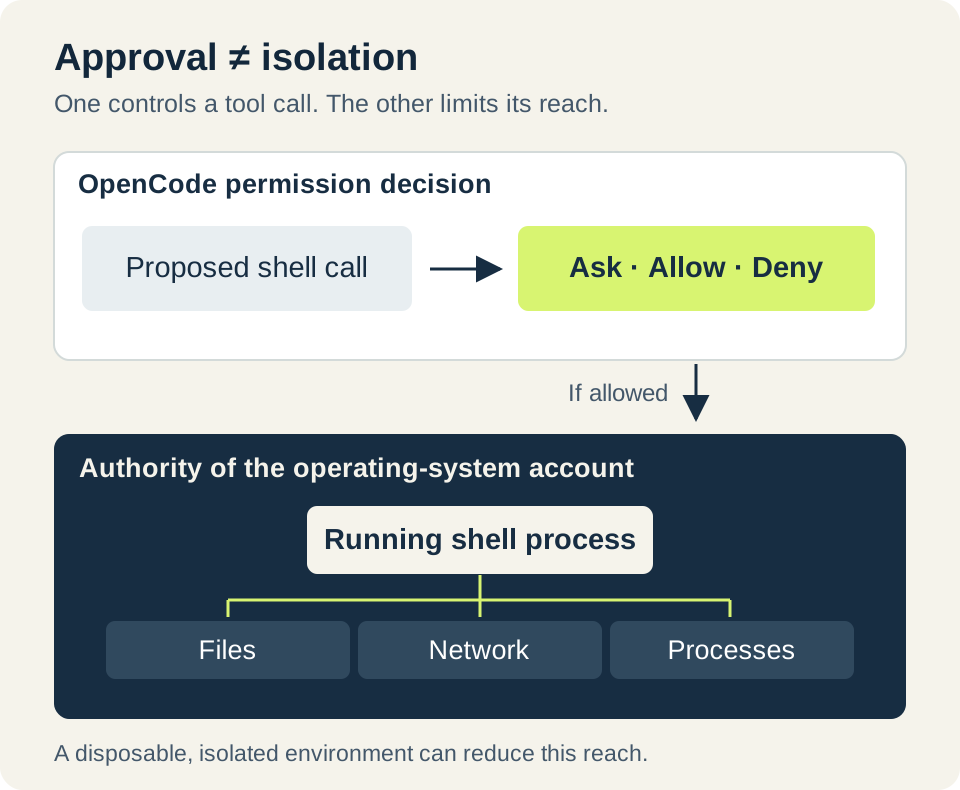
Two different controls: approval decides whether a proposed tool call proceeds; the execution environment limits what the running process can reach. The illustration is conceptual, not a screenshot.
A retry bug you can reproduce
Here is an illustrative helper with a deliberately bad rule. Save it as retry_policy.py:
def should_retry(status_code):
    return status_code != 200
It retries every response except 200. That includes 201, which represents a successful creation, and 401, where repeating the same unauthorized request will not fix the credentials. A retry helper this enthusiastic can manufacture extra traffic while contributing remarkably little to recovery.
For this exercise only, the desired rule is: retry 429 and 5xx responses; do not retry the other cases below. Save this as test_retry_policy.py:
import unittest
from retry_policy import should_retry

class RetryPolicyTests(unittest.TestCase):
    def test_status_policy(self):
        cases = [
            (200, False), (201, False), (400, False),
            (401, False), (429, True), (499, False),
            (500, True), (503, True), (599, True), (600, False),
        ]
        for status, expected in cases:
            with self.subTest(status=status):
                self.assertEqual(should_retry(status), expected)

if __name__ == "__main__":
    unittest.main()
Run the baseline before asking the agent to change anything:
python3 -m unittest -vYou should see five failing cases: 201, 400, 401, 499 and 600. The tests make the request concrete: they show which behavior is wrong and what this limited exercise expects instead.
This is a status-classification lesson, not a complete production retry policy. Real retries also depend on whether repeating the operation is safe, how long to wait, server guidance and a total attempt or time limit. A test that approves 503 tells you nothing about whether repeating a particular payment request is safe. HTTP retry semantics
Connect, explain, then repair
Start the agent:
opencodeInside its interface, run /connect and choose your provider’s offered authentication method. Enter an API key only into the provider credential prompt, never into the conversation or a committed project file. Then use /models to select an available model. OpenCode supports several authentication methods; the options come from the connected provider. Provider setup
Begin with a request that makes the reasoning visible:
Read retry_policy.py and test_retry_policy.py. Explain which cases fail and why. Do not edit files yet. If you want to run a command, show me the command first.
The useful answer should connect the failing assertions to the overly broad condition. If it wants to install a package for this two-file, standard-library example, ask why. There is nothing to install.
Once the explanation is sound, continue:
Change only retry_policy.py so that 429 and statuses from 500 through 599 return True. All other integer status codes should return False. Keep the tests unchanged. Run python3 -m unittest -v and report the result and the changed lines.
Review the edit and shell approvals. A straightforward implementation is a check for 429 or the 500–599 range. The important part is that the tests remain unchanged and then pass. Changing the expected answers would be a rather convenient way to repair the scoreboard.
Use /diff to inspect the agent’s changes. Because these are initially untracked files, also open the actual files and run git status --short; an empty ordinary git diff is not proof that nothing changed. Finally, run the test command yourself. The agent’s summary is helpful, but the files and test output are what you are evaluating.
OpenCode also offers /undo and /redo for recent conversation and eligible file changes. Snapshot capture is best effort and requires a Git worktree for file restoration. It does not reverse database writes, processes or other external side effects. Keep normal commits and backups for work that matters. Snapshot behavior
When something refuses to cooperate
If OpenCode reports the wrong version, check which installation your shell found. On macOS or Linux, command -v opencode shows the executable path. Remove the obsolete installation through its original package manager rather than deleting random files until the problem disappears.
If the interface cannot connect, inspect the service before reinstalling:
opencode service status
opencode api get /api/info
If the service is unhealthy, opencode service restart is the documented next step. Restarting affects the shared service, so finish or stop other active work first. Logs normally live at ~/.local/share/opencode/log/opencode.log. Redact secrets and private project content before sharing diagnostic output. Troubleshooting
If authentication or billing fails, return to /connect and verify the active account, chosen method and provider entitlement. Environment variables must reach the server that makes model requests; changing the environment in a new terminal does not necessarily change an already-running shared server.
If a familiar editor diagnostic is missing after upgrading, check the migration guide before chasing a broken installation. V2 currently accepts LSP configuration but does not run those language servers or produce their diagnostics. Run the project’s real lint, compiler or type-check command instead. Likewise, old session-sharing instructions are obsolete: the sharing backend and /share command were removed. Migration details · Release notes
Where this becomes useful
The retry exercise is intentionally small enough that you can understand the entire change. Once that loop feels comfortable, apply it to a real regression test or maintenance script: establish the failing behavior, ask for a bounded repair, inspect the change and run the relevant checks. Increase the scope because the previous job was useful, not because the next model sounds more confident.
OpenCode’s model choice and working interfaces make that loop convenient. The useful outcome is a patch that another person can understand and accept. If you are comparing adaptable coding tools, the Pi guide explores a different approach. Before connecting any agent to live operational tools, our production-agent guide explains the separate problem of authorizing and verifying real system changes.
Verification note: Official release notes and V2 documentation were checked October 20, 2026. The Python example’s failing baseline and reference correction were run locally. The OpenCode install, interactive session and provider authentication were documentation-checked, not exercised in a hands-on product test. No product benchmark or production result is claimed.
Sources & context
Sources linked in this article. Read alongside the author’s analysis; a citation does not independently verify a publisher’s claims.
- Launch announcementx.com
- 2.0 taggithub.com
- Changelogopencode.ai
- OpenCode introductionopencode.ai
- Official 2.0 release articleanoma.ly
- CLI architectureopencode.ai
- V1 migration guideopencode.ai
- Release notesopencode.ai
- V2 download pageopencode.ai
- Migration guidanceopencode.ai
- V2 installationopencode.ai
- Model access and pricingopencode.ai
- official noticex.com
- Permissionsopencode.ai
- HTTP retry semanticswww.rfc-editor.org
- Provider setupopencode.ai
- Snapshot behavioropencode.ai
- Troubleshootingopencode.ai
- Migration detailsopencode.ai
- Release notesopencode.ai