

On this page5 sections
Imagine a certificate is coming up for renewal. Nothing dramatic yet. You have time, you know there’s a procedure, and you distinctly remember thinking it looked straightforward.
Then you try to find it.
“Certificate renewal” brings back nothing useful. You try a shorter phrase, then a longer one. Somewhere in the collection sits the document you need, patiently answering to “credential rollover.” You and its author agree about the job. You just haven’t agreed on what to call it.
An embedding gives the search another way to make that connection. A model turns your question and each passage into lists of numbers that can be compared. Those numbers can capture relationships between different wording, so the right document has a chance of finding its way back to you without a perfectly remembered title.
There’s a small complication waiting in our imagined collection. Someone kept the old procedure, too.
The words change. The job sounds familiar.
Put “certificate renewal” beside “credential rollover.” To a person who knows the work, the connection may be obvious. A search needs something it can calculate.
So the embedding model gives each piece of text a fixed-length list of numbers, called a vector. It learned how to produce those lists during training. Related passages may receive vectors that compare as close, even when they share few words. Your question goes through the same process, letting the search compare it with the documents.
You might expect to open one of these lists and find a number for “certificates” and another for “urgency.” Unfortunately, the numbers don’t usually wear labels we can read. Their useful relationships emerge when we compare whole vectors. Which texts count as close depends on the model and the comparison method; a connection that feels obvious to us is not guaranteed.
The drawing below makes that relationship visible by placing renewal passages near a renewal question, with storage passages farther away. It is an invented sketch. Real embeddings have many more dimensions, and these dots are not measured positions from our example.
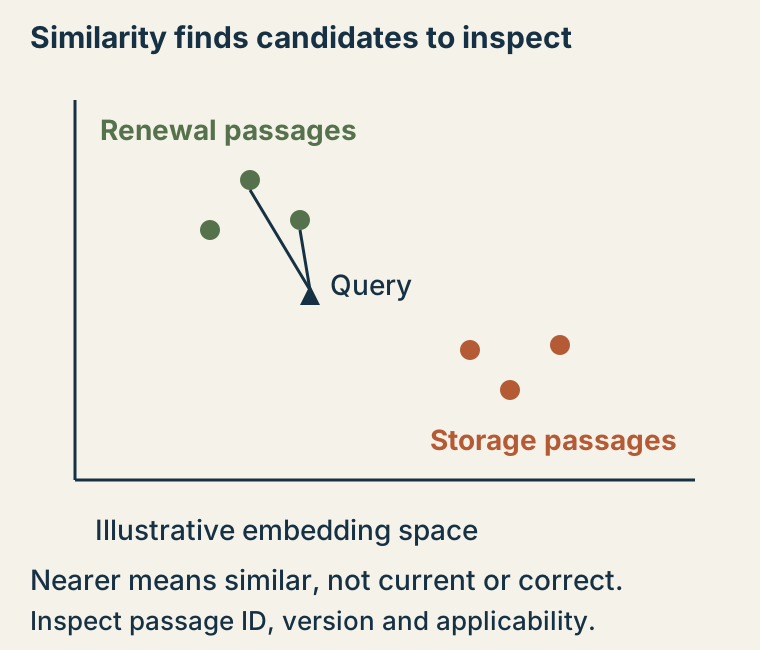
There’s a catch if you later replace the model. A new one might also give you 384 numbers per passage. That looks reassuringly familiar, but the numbers may no longer describe relationships in the same way. Questions and documents need compatible embedding spaces. Replacing the question’s model while leaving incompatible document vectors behind can spoil the comparison. Re-embedding the collection deserves the care of a migration, including fresh retrieval checks, rather than just a change of API address.
The old instructions have excellent vocabulary
Here is our collection in miniature: the old certificate procedure, the current edge-v2 procedure, and an unrelated passage about a filesystem that cannot create files.
Notice how promising the old one sounds. It says “renew” and “certificate” right there in the sentence. The current one uses “credential rollover.” This is exactly the sort of wording difference we want the search to handle. It is also why the passage’s version and status need to travel with its text.
You can try the comparison with the Sentence Transformers quickstart approach and its all-MiniLM-L6-v2 model. Use a disposable Python environment with network access and sufficient storage: the example downloads model files.
python3 -m venv .venv
. .venv/bin/activate
python -m pip install sentence-transformers
from sentence_transformers import SentenceTransformer
records = [
{"id": "cert-v1", "version": 1, "status": "superseded",
"text": "Renew the service certificate using the shared gateway job."},
{"id": "cert-v2", "version": 2, "status": "current",
"text": "Credential rollover for edge v2 uses its dedicated renewal job."},
{"id": "disk-v1", "version": 1, "status": "current",
"text": "Inspect inode availability when a filesystem cannot create files."},
]
model = SentenceTransformer("sentence-transformers/all-MiniLM-L6-v2")
vectors = model.encode([r["text"] for r in records], normalize_embeddings=True)
query = model.encode(["How do I renew edge v2 credentials?"], normalize_embeddings=True)
scores = (query @ vectors.T)[0]
for i in scores.argsort()[::-1]:
print(records[i]["id"], records[i]["status"], float(scores[i]))
print(records[i]["text"])These three records are hypothetical examples. No model run or ranking result is claimed here, and this is not a measured retrieval benchmark.
When you run it, the question and all three passages get vectors from the same model. The code compares them and prints every passage in score order, keeping its ID and status alongside it. Look at where the two certificate passages appear. Can you still distinguish the current edge-v2 job from the superseded shared job?
A score, with something you can draw
Next to each passage, the program prints a number. Where did it come from?
For a moment, set the documents aside and draw two arrows from the same dot on squared paper. One goes a single step to the right. The other goes 0.8 steps right and 0.6 steps up. Both arrows are one step long, though they point in different directions.
Their coordinate pairs are [1, 0] and [0.8, 0.6]. Multiply the matching coordinates and add: 1 × 0.8 + 0 × 0.6 = 0.8. That calculation is called a dot product. Draw another arrow straight up, [0, 1], and compare it with the right-pointing arrow. This time you get 0.
The code does that same arithmetic with much longer lists. First it rescales each vector to length one, keeping its direction. That step is normalization. With every vector at that length, the dot product equals cosine similarity, which compares their directions.
Our arrows make the calculation visible; their invented numbers are not scores for the certificate passages. A model still has to produce useful relationships in those longer lists. To find out whether it has helped with the renewal, we return to what the search actually found.
More documents, more places to lose the answer
Three passages are an easy afternoon for a computer. A large collection is a different proposition. Compare every passage with every incoming question and readers may spend a noticeable part of their day waiting for search.
A vector index arranges the vectors to help find matches. Faiss’s getting-started guide shows how records are added and searched. The choice of arrangement trades memory, speed and retrieval accuracy. An exhaustive search checks every candidate. An approximate nearest-neighbor search can skip some of that work and look for likely matches instead.
The faster route can miss a passage an exhaustive search would find. Try representative questions with known useful passages and see what survives the shortcut. A search that saves half a second but sends you back to guessing document titles has made a rather small contribution to your day.
Even a correctly retrieved passage can lose something on its way to the screen. Long documents are often split into smaller chunks before they are embedded. Picture the renewal instructions with a condition above them: “Do not use this procedure on edge v2.” Return the steps without that condition and you have found the subject while losing a crucial part of the meaning.
Keep enough surrounding text for conditions and exceptions to make sense, plus the original document link and location. A reader should be able to follow the passage back to the place where the author explained what it was for.
Back to the certificate
The old procedure may be an excellent answer to “How did we renew this before?” It can also be the wrong answer to the question you have today. Its high score, if it gets one, cannot decide that for you.
Before treating a passage as operating guidance, narrow it to what the reader is allowed to access and the product version involved. Private text must be kept out of unauthorized retrieval, not hidden behind a missing link after a model has already received it. And although dates help, the newest instructions may describe a newer system than the one you run.
If an AI assistant is helping with the renewal, it can read an appropriate retrieved passage before composing its answer. That arrangement is retrieval-augmented generation, or RAG. The quality of the passage it receives still matters, right down to the condition above the steps.
You came looking for a procedure, not an argument about whether “renewal” was the proper word. Embeddings can get you past that disagreement. Keep the source, context and version with the result, and you can return to the job you meant to do before the search box got involved.
Sources & context
Sources linked in this article. Read alongside the author’s analysis; a citation does not independently verify a publisher’s claims.
- Sentence Transformers quickstartwww.sbert.net
- Faiss's getting-started guidegithub.com