

On this page12 sections
A spam filter decides before you notice the message. A transcription app works through a recording. A chat assistant lets you watch its answer arrive. Each is using a trained model, but the work, result and wait are different.
Using a trained model to produce output is called inference. A message may produce a spam label, audio a transcript, a photograph an identified object and a prompt a new answer. Decide which result you need before choosing a model or buying hardware.
If a demo feels quick but slows when colleagues join, or a downloaded model will not run on your laptop, those different parts matter. The useful comparison is which complete setup finishes your job within the data, hardware, cost and time constraints you have.
Follow one request: what should come back, which program and machine will produce it, and did the result justify the wait? The local exercise later makes that trip visible without building a whole AI platform.
Using a model is different from teaching it
Training adjusts a model's learned numerical parameters, often called weights, using examples and a training objective. Inference uses those learned values to make a prediction or generate a response. The distinction is between changing the model and applying it, as the Google machine-learning glossary explains.
For a language model, the immediate prediction is usually about the next token, a piece of text. The model assigns probabilities to possible continuations, a decoding procedure chooses one, and the resulting text becomes part of the context for what comes next. Repeating that process produces an answer. “One token at a time” describes the basic dependency; optimized serving systems can accelerate it without turning generation into a lookup of a prewritten paragraph.
Pasting a runbook into a prompt gives the model material for this request without changing its weights. Fine-tuning is a separate training operation. A provider retaining requests or later training on them is a separate policy question again. An answer that uses the runbook has not, by itself, shown any of those other changes.
For a practical task, that distinction is useful. You can provide a document, a code snippet or a current, sanitized procedure and ask a model to explain it before considering any training project. You can also take the procedure away and see what the model invents in its absence. That second result is often more informative than another smooth demonstration.
When inference helps, and when a smaller tool is better
Language-model inference is useful when the input or output is messy language: explaining an unfamiliar function, drafting an email from notes, summarizing several documents, or turning a support request into a proposed category. Those jobs have room for interpretation. The model can make a useful first pass even when there isn't one exact sentence it must produce.
The choice changes when there is a precise answer and a reliable way to compute it. Adding a column of numbers belongs in a calculator or spreadsheet formula. Extracting a known field from a well-formed JSON object belongs in a parser. A model can help write that code, but putting generation into every execution adds uncertainty and expense where neither is needed.
A label, a vector, a transcript or a new image?
Imagine asking three systems to inspect the same photograph. One returns ‘cat,’ another marks the cat’s outline, and a third writes a paragraph about the scene. All performed inference; only one may have returned the shape your application needs. That is a more useful starting point than asking which model is biggest.
Classification and computer vision can return a category, a score, detected objects or regions of an image. Sorting photos and identifying a defective part are examples of this shape of task. A chat model that describes a photograph is doing something different from a detector that returns coordinates for every object. The application's next step determines which output is useful: a paragraph is awkward input for software that needs bounding boxes.
Speech recognition turns audio into text. For meeting notes, that transcript may be the first stage; a language model can then summarize it. Keep those stages separate when troubleshooting. A summary can faithfully repeat a name that the transcription stage heard incorrectly. Hugging Face's speech-recognition guide describes the audio-to-text task, while its pipeline guide shows the different input and output shapes supported across tasks.
Embeddings return vectors, lists of numbers, rather than a finished answer. They are useful for similarity search and retrieval. In a personal document search, you can embed the query and documents so the search system can look for related material, then use a generative model to explain the selected passages. That retrieval-plus-generation arrangement is often called RAG. Retrieved passages supply context without retraining the model; their presence doesn't guarantee that the answer follows them. The vector itself isn't a compressed paragraph you should expect to read back as prose. Ollama exposes an embedding endpoint separately from text generation.
Image generation creates new visual content. Diffusion models commonly do this through repeated denoising steps, rather than the next-text-token loop described below. The Diffusers pipeline explanation makes that progression visible. Image dimensions, generation steps and the chosen pipeline affect the work; a text model's tokens-per-second figure tells you little about how long that image will take.
Some models accept several kinds of input, such as text and images, and are called multimodal. That doesn't mean every endpoint accepts every medium or produces every output. Check whether you need to transcribe, classify, retrieve, describe or generate before selecting a model. The rest of the guide concentrates on generative text and its hardware and latency behavior. The general questions about data, cost and useful results transfer; prefill/decode and token-rate details don't describe every inference system.
How inference became a serving problem you could inherit
Inference didn't begin with chatbots. What changed was the range of work people could ask one language model to do, and the amount of computation required to deliver the answer.
The 2017 paper Attention Is All You Need introduced the Transformer architecture, initially demonstrated on machine translation. Its attention-based design made training more parallelizable than the recurrent approaches it compared against. That is a training result, not a promise that a modern chat model can produce its entire answer in parallel. The next part of a generated answer still depends on what has already been generated.
In 2020, Language Models are Few-Shot Learners showed GPT-3 performing a range of tasks from instructions and examples placed in the input, without task-specific weight updates during those evaluations. That helped make the prompt an important interface: instead of building a separately trained model for every task, an application could describe a task to an existing model. The same trained model could now be approached through quite different requests.
Then the serving machinery became a substantial problem of its own. The 2023 PagedAttention paper, which introduced vLLM, focused on managing the growing memory used during generation so a server could serve requests more efficiently. Its significance here is practical: once several people ask questions at the same time, how the runtime shares and allocates memory matters alongside the model's capabilities.
Those developments lead to today's choice. You can consume a hosted model through an API or operate a downloadable model yourself. Either way, the arithmetic has to happen somewhere. An API makes the machinery someone else's operational responsibility; it doesn't make that machinery disappear.
The model, the runtime and the machine are three different choices
Think of the model as the learned parameters and architecture, the runtime as the software that loads those parameters and executes the calculations, and the hardware as the CPU, GPU or other accelerator doing the work. Your application sits above them, preparing requests and using the output. An API is the interface between pieces of that software.
That last distinction saves a lot of confusion. “Local” and “API” are not opposites. A model on your laptop can have an HTTP API. Ollama, which we'll use below, exposes a local endpoint and also offers hosted models. Its API documentation even describes accessing cloud models through a local server. A localhost address is therefore not, by itself, a data-residency guarantee.
A dropdown can hide model, runtime and machine until something fails. The chosen model may use an unsupported format; the runtime may not understand it; the machine may lack working memory. Keeping the three separate gives the troubleshooting somewhere to go.
Suppose a model generates a useful explanation on a hosted service but your local installation refuses to load its downloaded counterpart. That isn't evidence that the prompt stopped working. You may have chosen an unsupported model format or a workload that doesn't fit in memory. Conversely, a model that loads and streams beautifully may still confuse readiness with liveness. More GPU memory won't correct that definition.
There is another boundary worth knowing before you install anything. A model request does not, by itself, grant access to your files or execute a command. An agent application can describe available tools to a model, receive a requested tool call, execute it, and send back the result. The application and its permissions determine what actually happens. The tool-calling documentation shows that exchange. Choosing a local model doesn't automatically sandbox the agent using it.
Why the answer pauses, then streams
Before generation begins, the runtime converts the request into tokens. Tokens can be words, word fragments, punctuation or other pieces; they are not reliably interchangeable with characters or words. Different tokenizers can divide the same text differently, as the Hugging Face tokenization guide shows.
The request may include your latest question, application instructions, conversation history and retrieved documents. All of that can contribute to the input. A tiny question at the bottom of a large incident bundle is still a large request.
For a typical autoregressive transformer, the runtime first processes the input in a phase called prefill. It establishes the information needed to begin generation. During decode, it produces subsequent tokens using the input and the output already generated. A key-value cache, or KV cache, retains intermediate attention information so earlier work can be reused. It saves recomputation; it is not a cache of fact-checked answers. Hugging Face's cache documentation explains the mechanism.
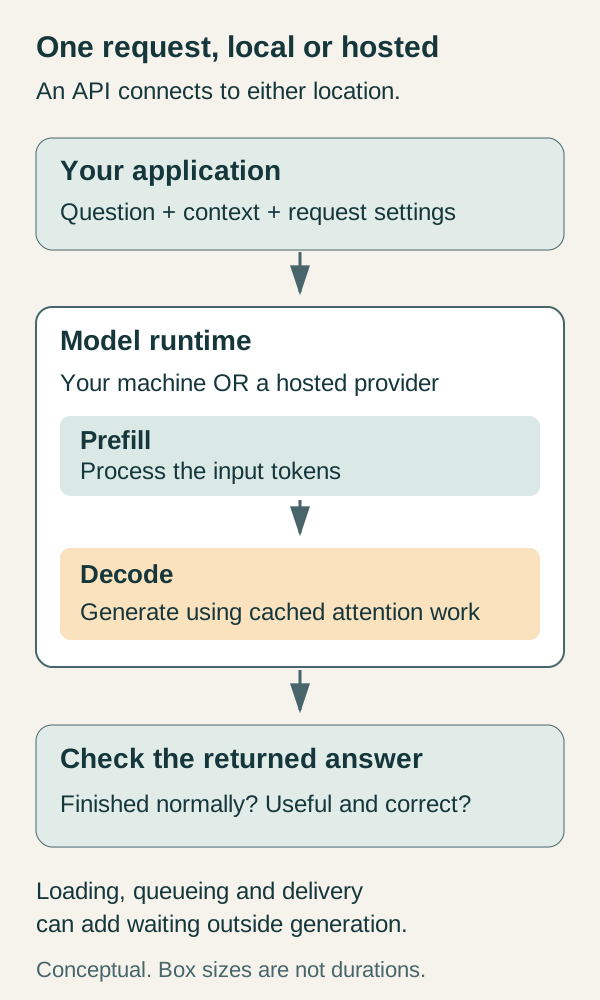
Behind the waiting cursor, the request may queue, the runtime may load weights and the input must be processed. Then output arrives piece by piece. A long pause followed by quick text points to a different part of that trip from an answer that starts promptly and crawls.
That's why it helps to keep three questions separate:
- When did the answer start? Time to first token, or TTFT, depends on the specified measurement point. The first readable answer text at your client can arrive later than a server's first generated token, especially if the system emits metadata or separate reasoning output first.
- When was the answer usable? An engineer can read an explanation as it streams, but an application may need the entire response before parsing and checking it. Completion latency matters even when the opening sentence appears quickly.
- How much work did the service handle? Throughput might count generated tokens across all requests per second. It describes a different property from the wait experienced by one caller.
The vLLM metrics reference distinguishes these scopes. A server can improve aggregate throughput while making individual requests wait longer, so neither a busy GPU nor a healthy token-rate graph settles the user-experience question. The deeper streaming-latency guide shows how to measure the client side without mistaking every network event for a model token.
Picture the same request twice: once asking for a one-sentence answer, once asking for a long explanation. The input work is similar, but the second answer needs more generation steps. Now keep the answer short and paste in a long document. You have changed the input work instead. This is why measuring only the moment the first word appears leaves part of the experience unexplained.
Where should this request run?
Start with the data. If private documents, source code or incident evidence cannot leave an approved environment, a convenient hosted endpoint outside it is not a candidate. Running a suitable model inside that environment may be the right answer, provided the application, its logging and any tools also respect the boundary. Local inference does not automatically make the rest of the application local.
If the data can go to an approved provider and you're still finding out whether the model helps, hosted inference is often the simpler experiment. You can evaluate answers without first selecting accelerators, fitting weights into memory and maintaining a serving process. You still own request limits, timeouts, output checking and the consequences of an unavailable provider. The provider's data-retention and training terms need to match your use; “API” is not a privacy policy.
Local execution becomes especially useful when you need offline operation, control over the exact model artifact, or a workload that must stay on a particular machine. It also gives you a direct view of loading and memory behavior, which is why this guide uses it as a learning exercise. That is a reason to learn locally, not a claim that every production assistant should be self-hosted.
The hardware question comes next. The downloaded weights occupy memory, but the running request also needs working space and often a KV cache. Longer contexts and more simultaneous requests can make a configuration that handles one short question run out of room. Quantization represents some model values with fewer bits, reducing storage or memory requirements; its effects on quality and speed depend on the model, format, runtime and hardware. The Hugging Face optimization guide covers those tradeoffs.
The model card’s parameter count is only part of the load. The runtime must support the artifact, and the machine needs room for the request length and simultaneous users you intend. A setup barely holding one short prompt may be uncomfortable for a real conversation. Try that conversation before buying around the number.
Nor does local automatically mean faster. It removes a remote network trip, but your laptop may spend much longer generating the answer. A hosted service might generate quickly and still make you wait in a queue. Compare the complete request at the demand you expect, not an isolated best-case number from either side.
There is also a middle ground between a laptop and a provider's shared API: operating your chosen runtime on rented hardware or a dedicated endpoint. That can provide more capacity and control, but someone still needs to manage the deployment and bill. “Cloud” describes a location and service arrangement, not one fixed level of privacy or responsibility.
The price of a useful answer
Hosted and local costs arrive in different packaging. Many hosted APIs charge separately for input and output tokens, with additional rules for caching, tools or other services. Self-hosting brings hardware or rental charges, electricity, maintenance and capacity you pay for even when nobody asks a question.
Here is an illustrative calculation, not a vendor quote. At invented prices of $1 per million input tokens and $4 per million output tokens, a request with 2,000 input tokens and 500 output tokens costs $0.004: $0.002 for each side. Three attempts cost $0.012 before any other charges. The arithmetic is easy. Deciding whether those attempts produced useful work takes more attention.
Consider a hypothetical readiness-probe helper that answers quickly but says a failed readiness probe restarts the container. Someone now has to catch the error, correct it and distrust the next answer. Its token rate can be excellent while its contribution to the task is negative. A slower answer that gets the distinction right may finish the work sooner.
Use the same acceptance test when comparing local and hosted setups. Include retries, rejected requests, incomplete answers and the effort of reviewing the result. For self-hosting, spread costs across a realistic volume of accepted tasks rather than assuming the machine will stay busy all month. The token-cost guide develops this accounting further. The first experiment below supplies a much smaller test: one answer whose central claim you can check yourself.
Four request settings worth understanding
These settings are easier to understand when you tie each one to something you can observe: a missing part of the source, an answer cut off halfway through, different wording on repeated runs, or text arriving before the response is complete. The API names vary, but the questions underneath them are quite ordinary.
Context length is the amount of tokenized material the model can consider within its configured window. Conversation history, instructions and retrieved text compete for that space with generation. A model's advertised maximum does not establish your runtime's current setting, available memory or behavior when input is too long. For a document summary, inspect whether the whole document was actually sent before blaming the model for missing the ending.
Output limits cap how much a request can generate. They are useful for controlling work and cost, but a cap is not a target and reaching it can leave an answer unfinished. “Explain this in three sentences” is an instruction to the model; it is different from a runtime-enforced token limit. Check the finish reason rather than assuming every returned response is a completed one.
Temperature and other sampling settings influence how a continuation is selected from the model's possible next tokens. Lower temperature generally favors higher-probability choices; it does not turn the model into a fact-checker or promise identical output across every backend. For comparisons, keep the settings fixed and record them. Ollama's parameter reference documents its names, including temperature, context size and output-token controls.
Streaming determines whether you receive partial output as it becomes available or wait for the completed response. It is helpful for reading a long explanation. For an application expecting a structured result, you still need to assemble and validate the output. Where supported, a JSON schema can constrain its shape; the structured-output documentation explains that feature. A valid JSON object can still contain a wrong answer.
The controls cannot supply missing evidence. Lowering temperature does not put an omitted source into the request, and a longer answer can give a confused definition more room. Use the settings to shape a capable setup; use its actual answer to decide whether it is capable.
Try one request you can check yourself
Example status: the commands below were checked against current documentation and validated for shell syntax, argument preservation and JSON. No local or hosted model was run for this guide; no captured output or measured performance is claimed.
Use Ollama's local runtime for this exercise. It lets you see the request and returned timings directly, and a synthetic question avoids using private material. The example asks about Kubernetes because its answer has a clear reference, but the same request shape works for a writing or coding question you can independently judge. You'll need:
- Ollama installed from its official quickstart, with its local server running.
- A downloaded local text model supported by your machine. Review its license, download size and memory guidance before choosing it. The current quickstart uses
gemma4:e2b; this exercise works with the suitable local model you actually installed. - A POSIX-compatible shell, such as a macOS or Linux terminal, and curl 7.76.0 or newer for
--fail-with-body. The curl manual documents the flags. PowerShell has different quoting rules, so use a compatible shell rather than pasting these commands unchanged.
The setup route is deliberately small: open Ollama, choose and download a local model, and keep its server on the default loopback address. On Linux, the quickstart says to start ollama serve if it isn't already running. No cloud sign-in or API key is required for the local request. For the quickstart's gemma4:e2b example, the download command is ollama pull gemma4:e2b. The documentation lists an approximately 7.2 GB download and recommends 8 GB of available VRAM, or unified memory on a Mac; longer contexts need more memory. If that does not fit your machine, choose a smaller supported local model before continuing. A successful download alone does not prove it can run comfortably.
First ask the server which models are available:
curl --fail-with-body --silent --show-error \
  http://localhost:11434/api/tags
The model-list response includes a name and digest for each entry. Copy the exact name of your downloaded local model into the next command in place of YOUR_LOCAL_MODEL. Save its digest with your notes if you want to repeat the comparison later: a friendly model tag can move to a different artifact.
If Kubernetes is unfamiliar, use this plain-language alternative for the prompt value in the next request: “A fictional library is open Monday through Friday, 09:00 to 17:00, and closed on Saturday. Can I visit at 10:00 on Saturday? Explain using only this note.” The supported answer is no: the Saturday closure applies even though 10:00 falls within the weekday hours. This tests whether the model uses a supplied exception. The Kubernetes prompt below tests a technical distinction instead; choose the one you can explain yourself.
curl --fail-with-body --silent --show-error \
  --max-time 120 \
  http://localhost:11434/api/generate \
  -H 'Content-Type: application/json' \
  -d '{
    "model": "YOUR_LOCAL_MODEL",
    "prompt": "Explain what a Kubernetes readiness probe checks in three sentences.",
    "stream": false
  }'
This uses the documented generate endpoint. stream: false asks for a single response, making the returned fields easier to inspect. The 120-second client deadline bounds this exercise; it isn't a promised generation time.
Look for nonempty text in response. A done value of true says generation has ended; it doesn't establish that the answer is complete or correct. The documentation's ordinary-stop example uses done_reason: "stop". Investigate a different finish reason or an apparently cut-off answer before calling the request successful.
Now inspect the answer against the question you chose. For the fictional library, Saturday is closed; weekday opening hours do not override that exception. For the Kubernetes prompt, a readiness probe determines whether a container is ready to accept traffic, while a failed liveness probe can lead to a restart after its failure threshold is reached. Different wording is fine. Changing the consequence is not. In either case, the request is useful because you have an independent way to judge what comes back. See Kubernetes probe documentation.
If the connection is refused, check that the local server is running. If the model is missing, compare the name against the list you retrieved. For unexpectedly slow generation, ollama ps shows whether the model is loaded on CPU, GPU or both, as described in the Ollama FAQ. A timeout leaves the experiment unresolved; check what happened before retrying. Keep the server on loopback rather than exposing an unauthenticated learning exercise to the network.
Taking the same idea to a hosted endpoint
A hosted request has the same basic ingredients: the selected model, your input and generation settings. What changes is the destination, authentication and the service contract. For example, Ollama's API introduction documents a hosted chat endpoint at https://ollama.com/api/chat, using bearer authentication, while the local endpoint needs no API key. Its chat body uses a messages array; the generate example above uses prompt. Changing only the hostname is not a general migration procedure.
Before making a hosted call, choose the model in the provider's current documentation, confirm the account's pricing or plan limits, and keep the API key in the calling application's secret configuration rather than source control or browser code. Start with a synthetic input. Inspect the returned answer and usage, then test the failure behavior your application will have to handle, including rate limits and timeouts.
If you're comparing hosted and local options with different models, call it a comparison of two complete setups. That is often exactly the decision you need to make. It does not isolate whether a difference came from the model, quantization, runtime, hardware or network. Keep the question honest and the comparison remains useful.
Read the timing without promoting it into a benchmark
Ollama returns usage and timing fields with the result. load_duration measures model-loading time. eval_count counts generated output tokens, and eval_duration measures their generation time in nanoseconds. For a positive duration, the generation rate is eval_count / (eval_duration / 1,000,000,000). That rate excludes the larger question of how long you waited for a useful answer.
A second request may avoid loading work, and repeated input may benefit from caching. Those conditions explain why repeating the same prompt can feel faster without establishing a general speedup. If you later compare two runtimes, keep the model, prompt and settings steady where possible, and check the answer again. The inference-compatibility guide covers the protocol and output differences that matter once an application depends on them.
After the first checked request, you know which model answered, where it ran, what the wait contained and whether its main claim held up. Repeat the same question on a hosted setup and the comparison has a purpose: what changed in cost, delay and the work still left to you?
Sources & context
Sources linked in this article. Read alongside the author’s analysis; a citation does not independently verify a publisher’s claims.
- Google machine-learning glossarydevelopers.google.com
- speech-recognition guidehuggingface.co
- pipeline guidehuggingface.co
- RAGhuggingface.co
- embedding endpointdocs.ollama.com
- Diffusers pipeline explanationhuggingface.co
- Attention Is All You Needarxiv.org
- Language Models are Few-Shot Learnersarxiv.org
- PagedAttention paperarxiv.org
- API documentationdocs.ollama.com
- tool-calling documentationdocs.ollama.com
- Hugging Face tokenization guidehuggingface.co
- cache documentationhuggingface.co
- vLLM metrics referencedocs.vllm.ai
- Hugging Face optimization guidehuggingface.co
- parameter referencedocs.ollama.com
- structured-output documentationdocs.ollama.com
- official quickstartdocs.ollama.com
- curl manualcurl.se
- model-list responsedocs.ollama.com
- generate endpointdocs.ollama.com
- Kubernetes probe documentationkubernetes.io
- Ollama FAQdocs.ollama.com
- usage and timing fieldsdocs.ollama.com