

On this page13 sections
You explained the weekly report once. Next week, you would rather hand over the new files than teach the whole procedure again. Hermes Agent is an open-source assistant from Nous Research built for that continuity: it can use tools, retain conversations and keep reusable procedures while you choose the model and environment.
The useful thing to carry forward is the method. Last week's conclusion needs checking again. This guide follows that difference through a small lab where every pipeline job says “success” while its data gets older. You can calculate the answers yourself, review the report and then test whether a saved skill responds to a changed row.
The walkthrough targets Hermes v0.22.0, originally checked against official documentation and tagged source on October 14, 2026. Selected tagged sources were reopened October 29. Hermes was not installed or run for this article. Examples are constructed exercises, not recorded agent results.
The model answers; Hermes manages the working session
Hermes is an application around a model, not a model itself. The MIT-licensed project does not supply unlimited inference or make every connected service local. Models, hardware and services have their own costs and terms.
Ask it to compare a runbook with a configuration file. Hermes sends your request, relevant context and tool descriptions to the selected model. The model requests a file read; Hermes executes it and sends the result back. Another response may request another read, a calculation or produce the comparison. That repeated exchange is the agent loop described in the overview.
| Piece | Its job | In this guide |
|---|---|---|
| Model | Interprets the request and proposes the next action or answer | Claude Sonnet 4.6 |
| Model access | Connects Hermes to a service running inference | OpenRouter, routing to a model provider |
| Agent | Manages the conversation, tools, and retained knowledge | Hermes Agent |
| Execution environment | Runs the agent and determines what its processes can reach | A dedicated Linux VM |
Inference means producing a response from model inputs. OpenRouter routes requests to model providers; it does not replace Hermes's tools or saved state. See the provider integrations. More tools make more actions available, but do not make a weak action choice correct.
Nous also produces the Hermes model family. Hermes 3 and 4 predate this agent, as the release history shows. Hermes Agent can use other developers' models; the shared name does not require the products to be used together.
Why the version matters
Nous lists the agent's launch as February 25, 2026. The March 12 v0.2.0 notes describe an internal project broadened through community contributions, already including messaging, MCP, skills and editor connectivity.
The v0.16.0 desktop release, dated June 5 and published shortly after midnight UTC June 6, introduced an Electron app for macOS, Windows and Linux with remote-gateway connections. The computer displaying the conversation need not be the one running the work.
The v0.22.0 notes are dated October 13, with GitHub publication October 14 UTC. They add guided desktop onboarding, hosted-app connectors and a managed local-model route using llama.cpp. That development explains why an older tutorial's screenshot can be genuine yet show menus absent from this version. Follow the relevant current instructions when your interface differs.
Save the recipe separately from yesterday's result
Imagine taking over a colleague's report. A saved conversation explains how they reached it; a project convention says to use UTC; a procedure tells you how to calculate freshness. Hermes stores those kinds of information differently.
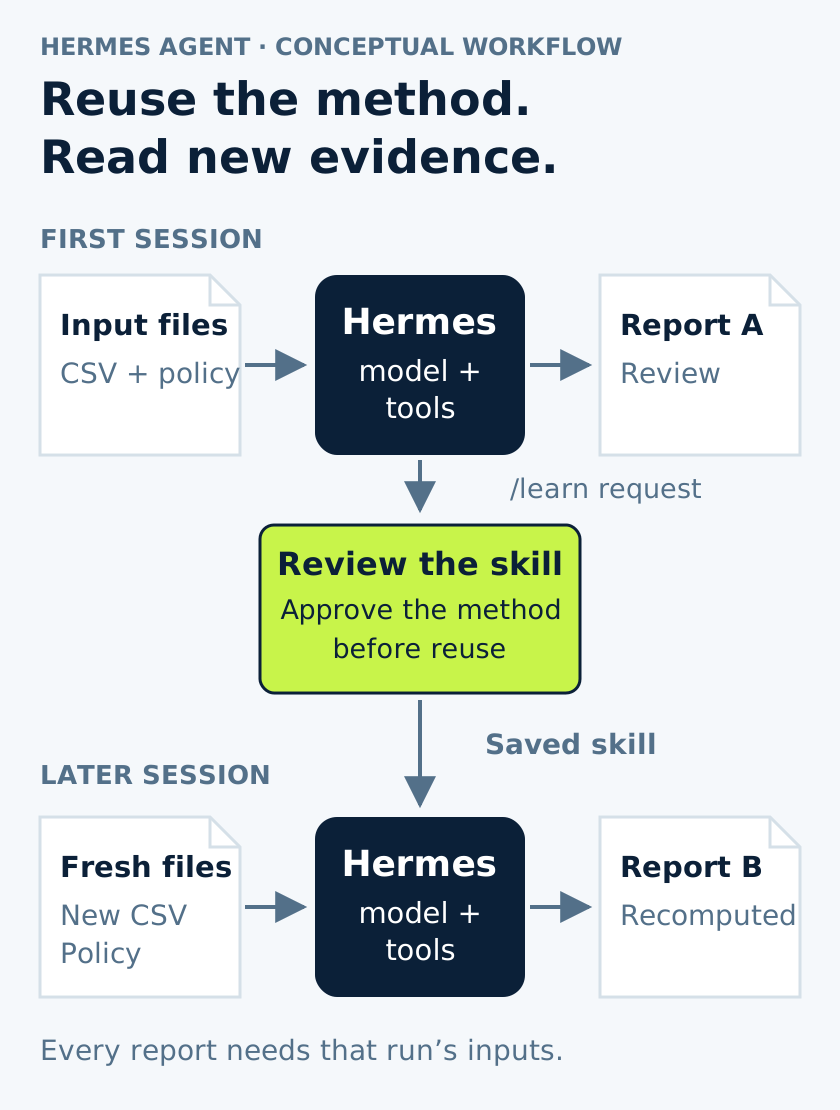
A session retains conversation and tool results. Memory makes selected facts and preferences available across sessions. A skill usually stores a procedure in SKILL.md plus supporting material. The memory and skills documentation explains their roles.
Saving those files does not retrain model weights. It gives later requests information they otherwise lack. That makes the saved method inspectable: you can remove an obsolete assumption. To assess a “self-improving” claim, check what actually improved. Did a new run reuse sound steps or just repeat an old answer? Our changed-row exercise will separate them.
Look for repeated work with changing inputs
A release brief is one candidate. With the appropriate web, file and terminal tools, Hermes can compare official notes with a local inventory and draft a source-linked explanation of relevant changes. Preserve unresolved questions so a reviewer can follow the comparison. Browser and media capabilities are optional and may require their own setup, model support and paid services.
Repository work uses the same loop: inspect files, edit code, run commands and read the results. The CLI and project context can support a parser draft or configuration investigation. A patch still needs review and testing; its existence does not show that a service is fixed.
Recurring work makes persistence more visible. The scheduler can start fresh sessions and deliver results, while the gateway connects messaging services including Telegram, Discord and Slack. A schedule requires a running gateway; a remembered request is not a running job.
For a less technical example, supply this week's meeting notes, last week's decisions and an agenda format. Ask for unfinished items with supporting passages. After review, save the agenda-building method, then use fresh notes next week. Dates, owners and open work should come from those notes, not the saved example. You can do this with files and review the draft before sending it, without connecting a mailbox or calendar.
MCP, the Model Context Protocol, and the release's hosted connectors can add access to applications. That may remove copying between a ticket and report. It also changes which records and actions the assistant can reach, so choose access deliberately.
Keep the simpler option in the comparison
If you only need an explanation of a log excerpt, chat may suffice. If the job is fixed arithmetic over a stable schema, a script is easier to make deterministic and test. This lab's arithmetic is intentionally simple enough to check without an agent. Hermes earns its place by reading the policy, explaining the result and reusing the reviewed method on new inputs.
For terminal-first coding, Pi offers a minimal harness with extensions, skills and prompt templates. Hermes packages more persistent-assistant functions such as messaging and scheduling. OpenClaw is a closer comparison for a self-hosted assistant reached through multiple channels. Compare needed integrations, maintenance and your actual tasks; this article establishes no performance winner.
Start with checkable operational reports. Validate a saved skill on changed data before giving it production access. Unattended remediation is a different proposition: explaining a restart fluently does not show that restarting is appropriate.
Count the repeated requests, not only the last paragraph
The software download is one cost component. The host, model and enabled tools also consume resources. Hosted-model calls can repeat instructions, conversation history and new tool results; a short final answer may follow many expensive reads.
/usage reports tokens and estimated cost; reconcile actual charges with provider billing. The CLI guide describes usage reporting. At the Sonnet 4.6 listing rates checked for the original guide ($3 per million input and $15 per million output tokens), 20,000 uncached input plus 2,000 output tokens totals $0.09. That is illustrative arithmetic, not a fixed task price. Calls, caching, tools and rate changes matter. Set a small key limit and check current rates before the lab.
A local model trades hosted-inference charges for hardware, memory, power and administration. It still needs workable tool calling and enough context. A local endpoint also does not make web tools, connectors or auxiliary services local. Trace the entire data path before calling an installation private or offline.
Give the first experiment an obvious home
The desktop app is a valid way in; use its platform instructions if that suits you. This walkthrough instead uses a disposable Ubuntu 24.04 VM, a dedicated non-root account and one model through OpenRouter. It is a teaching setup, not a requirement for every deployment.
Prepare a normal account, Git, curl, tar and SHA-256 utilities. Source builds may need a compiler and libraries; minimal Ubuntu images need libatomic1 for the managed Node runtime. Allow installation and model network access, but keep ordinary home-directory mounts, forwarded SSH agents, production credentials and production networks out of this lab.
Have an OpenRouter account with a limited key and a tool-capable model offering at least the quickstart's 64,000-token minimum. Review prerequisites and provider setup. The provider receives request content, which is why the files below are invented. The source installer manages runtimes; first-party installs described here use Python 3.14 rather than an old tutorial's Python 3.11 setup.
Read the installer, then install the pinned source
Download the tagged script and inspect it, or follow your organization's approved installation process:
curl -fsSLo hermes-install.sh \
  https://raw.githubusercontent.com/NousResearch/hermes-agent/v0.22.0/scripts/install.sh
After review:
bash hermes-install.sh \
  --commit e06df9c2eae6901f4c88f464e0ae6e753c0428b8 \
  --non-interactive --skip-browser --skip-computer-use

export PATH="$HOME/.local/bin:$PATH"
hermes --version
The commit pins v0.22.0 source; the installer tag alone would not pin what it installs. The flags skip interactive setup and optional browser/computer-use downloads. Dependencies and managed tools still download, so this is not an offline install. Keep the tagged installer beside the release notes when checking behavior.
Choose the model and where its tools run
hermes setupOn the fresh installation choose Blank Slate, OpenRouter and anthropic/claude-sonnet-4.6, entering the key in the setup flow. The original model listing supplies tool support and a one-million-token window; this is a concrete starting option, not a claim of universal superiority. Choose the local terminal backend, meaning the VM account running Hermes.
Finish with “Start with everything disabled.” In v0.22.0 that minimal choice still retains baseline file/terminal tools, vision and skills support, while built-in memory is disabled. Inspect bundled skills with hermes skills list. The tagged setup implementation gives this more precise meaning than the quickstart's short label. We will narrow the offered toolsets further.
hermes config set approvals.mode manual
hermes config get terminal.backend
hermes doctor
Confirm the backend reports local and investigate doctor errors before adding integrations. Manual mode asks about commands matching dangerous-command checks; it does not require approval for every tool call. See approval modes.
Read the successful jobs whose data is falling behind
Create the lab directory in the VM:
mkdir -p ~/hermes-freshness-lab
cd ~/hermes-freshness-lab
Save this as pipeline-runs.csv. All timestamps are UTC; each source timestamp is the newest event in that completed run's data.
run_id,finished_utc,max_source_event_utc,status,rows_loaded
run-101,2026-10-14T09:00:00Z,2026-10-14T08:57:00Z,success,1200
run-102,2026-10-14T09:15:00Z,2026-10-14T08:57:00Z,success,1180
run-103,2026-10-14T09:30:00Z,2026-10-14T08:57:00Z,success,1165
Save the rule as freshness-policy.md:
This is synthetic teaching data, not a live service.
For each completed run, freshness age is:
finished_utc minus max_source_event_utc.
The target is an age of 15 minutes or less at completion.
A successful job status does not establish that the target was met.
Report observed values separately from possible explanations.
The export contains no source-system or extraction-cursor evidence.
Do not infer a root cause from this export alone.
Start the session from this directory:
hermes chat --toolsets file,terminalThe toolset selection enables file and terminal operations; it neither makes the folder read-only nor confines access to it. Give Hermes the bounded request:
Read pipeline-runs.csv and freshness-policy.md in this directory.
Calculate freshness age in minutes for each run.
Identify which runs meet the target and cite the CSV row or run ID.
Explain what the successful status and row counts do and do not show.
Separate observations from hypotheses and identify the next evidence
needed to distinguish the hypotheses.
Write a concise report to freshness-review.md.
Use only these local inputs; do not contact services or change them.
Watch the reads and inspect the written report. Interrupt if the work leaves those inputs. Activity in a terminal is not proof of progress toward the requested answer.
Calculate the answer before trusting the explanation
The ages are 3, 18 and 33 minutes. Only run-101 meets the 15-minute target. All three jobs completed and loaded rows, but their newest source timestamp never advanced.
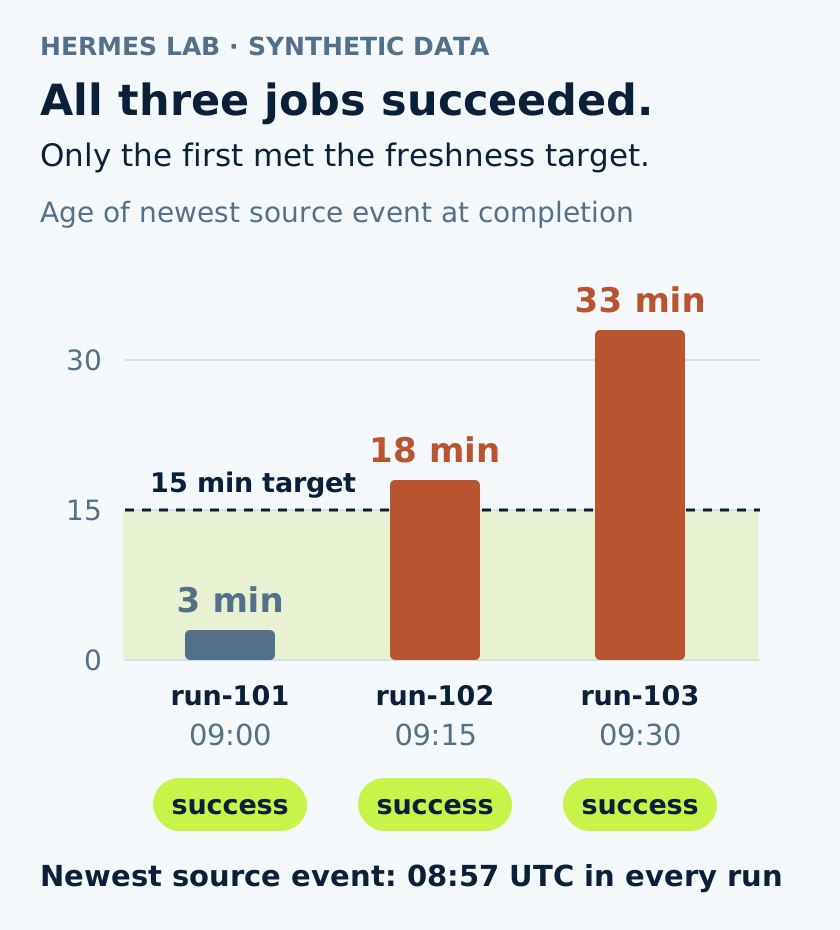
Those calculations are your answer key, not recorded Hermes output. Ask whether newer source events existed and whether extraction advanced. The CSV cannot distinguish a quiet source, a stuck cursor or incorrect timestamps. Correct arithmetic followed by “the extractor is broken” is still an unsupported report.
Save the checked steps and change one row
Keep the method: read the policy, calculate ages, compare with the target and separate observations from hypotheses. Do not preserve this fixture's findings as current service facts. Exit, enable skill-write review and start a session that can manage skills:
hermes config set skills.write_approval true
hermes chat --toolsets file,terminal,skills
In this new session, ask Hermes to read the CSV, policy and reviewed report, then request the reusable procedure:
/learn Create a skill named pipeline-freshness-review from this workflow.
On every use, read the newly supplied CSV and policy, verify timestamp
units and timezone, and recompute every age. Keep observations separate
from hypotheses. Require new evidence before diagnosing the source or
extractor. Do not save the example's timestamps or findings as current
service facts. Do not add service access or remediation steps.
/learn is a request, not evidence a skill was saved. Inspect the pending change:
/skills pending
/skills diff <id>
Replace <id> with the actual identifier. Read the full skill and attached scripts before applying that change:
/skills approve <id>If it hard-codes sample findings or adds unrelated operations, use /skills reject <id> and explain the correction. These skill controls govern the skill-management tool, not operating-system permissions.
Copy the CSV to pipeline-runs-updated.csv. Change only run-103's source timestamp to 2026-10-14T09:27:00Z. Start a fresh session:
hermes chat --toolsets file,terminal,skills/pipeline-freshness-review Review pipeline-runs-updated.csv against
freshness-policy.md. Write freshness-review-updated.md.Run-103 should now be three minutes old and meet the target. Run-102 should still fail at eighteen minutes. That small counterexample shows whether the stored steps lead to new calculations or repeat yesterday's verdict. It is a proposed check, not a benchmark result.
Memory can stay off. If you later need stable project preferences, enable Memory for the CLI in hermes tools, set memory.memory_enabled true and start a new session. Blank Slate disables both access and the underlying setting; changing one alone is insufficient. See memory configuration. Keep changing service state in fresh inputs.
Give each kind of knowledge a maintainable home
A repository AGENTS.md can describe input locations, test commands and report conventions. Check existing context files and their precedence first. In a clean lab, project guidance could be:
# Report-review lab

Inputs are synthetic CSV files and Markdown policies in this directory.
Use UTC and state the timestamp used for every age calculation.
Write reports to new files; preserve the supplied inputs.
Every report must separate observed values, interpretations, and missing evidence.
This is guidance, not enforcement. Version shared project instructions and review unfamiliar repositories' context before use. The discovery rules determine which file is loaded.
Use skills for procedures, memory for durable preferences, and SOUL.md for tone and behavior. Hermes reads identity from its home, normally ~/.hermes/SOUL.md, rather than adopting a checkout's identity file. “Show calculations” helps; “be absolutely certain” cannot create evidence.
Distinguish missing instructions from missing access. A skill teaches use of available tools; an MCP server or plugin adds capabilities and dependencies. An integration will not fix a misunderstood method.
Profiles separate Hermes homes containing configuration, sessions, skills and memory. That organizes assistants; it does not replace OS isolation. Subagents instead delegate current work into fresh conversations and may share the execution environment. Parallel work still needs file ownership and a model budget.
Find disagreement without choosing a winner too soon
In a separate lab folder, save this invented service-config.yaml:
service: invoice-worker
request_timeout_seconds: 30
max_attempts: 3
And this runbook.md:
# Invoice worker
Requests time out after 20 seconds.
The worker makes at most 5 attempts per request.
Run hermes chat --toolsets file,terminal there and ask:
Compare service-config.yaml with runbook.md.
Write drift-review.md with each disagreement, quoting the relevant
configuration key and runbook sentence. Do not edit either input.
Do not assume the configuration is deployed or that either file is
correct. End with the evidence needed to resolve the disagreement.
The discrepancies are thirty versus twenty seconds and three versus five attempts. Neither file establishes the deployed behavior. Inspect running configuration and how the application reads it before deciding what to edit. Making the wrong file agree can leave a tidy repository and an incorrect procedure.
This read-and-compare stage is a useful start for larger work. A saved procedure can preserve it without declaring that configuration always outranks documentation.
Contain the whole process, not just one tool
Hermes works with its account's permissions. “Only use these files” guides the model; it does not enforce filesystem or network restrictions. The v0.22.0 security policy distinguishes a Docker terminal backend from whole-process containment: code execution, MCP subprocesses, plugins and hooks can still run from the agent process. Place the whole process tree inside the chosen isolation environment when that is the required boundary.
Bad decisions may come from misunderstanding legitimate evidence or from malicious instructions embedded in data. The latter is prompt injection. The security model does not treat obedience as the final access control. Restrict reachable services, credentials and readable information.
For real reports, export only necessary fields, remove secrets and unnecessary personal data, and review provider handling. Local transcripts, skills and memory retain information too; a saved procedure can accidentally keep an endpoint or customer identifier.
The gateway uses allowlists or pairing. Its documented admin/user division governs slash commands and should not be read as comprehensive authorization for ordinary-chat tool use. Keep the first connected job report-only and review its output.
Before scheduling, name the input location, time zone, report destination and missing-data response. Inspect the actual job and execution record. Once work starts without someone present, the assistant has service responsibilities: dependencies, retained state and costs.
Add runtime controls when the access warrants them
Hermes performs the work; OpenShell can enforce filesystem, process, network and inference rules around it. Hermes documents whole-process wrapping, and NVIDIA's NemoClaw integration supplies an image, policies and inference setup.
That is a separate deployment choice with compatible versions and providers to check. Selecting the Docker terminal backend does not reproduce it, and the basic lab does not require it. The OpenShell policy exercise shows permitted and denied requests; its credential section explains provider-managed keys outside the workload. These controls limit access, not the correctness of a report.
Find the handoff where work stopped
Did the program start, the model answer, the tool read its input and the report use it correctly? Those questions point to different repairs. Reinstallation rarely helps an agent that already read the right CSV and inferred the wrong cause.
| Symptom | First check | Why it matters |
|---|---|---|
The shell cannot find hermes |
Confirm $HOME/.local/bin is on PATH; open a fresh shell or use the export above |
A missing launcher path is not a model problem |
| The model rejects a request | Use hermes model; check the selected provider, key, billing, model availability, and context capacity |
Installing more tools cannot repair authentication or an unsupported model request |
| Hermes cannot see an input file | Check the launch directory and hermes config get terminal.backend |
Another backend may see a different filesystem |
| A requested tool is absent | Check hermes tools and the current --toolsets selection |
A per-run selection does not override every globally disabled capability |
| A skill is missing | Inspect /skills pending, the approval result, and hermes skills list |
A statement in chat that it was saved is not a file check |
| Memory seems off after Blank Slate | Enable Memory for the CLI and its underlying setting, then start a new session | Tool access and memory configuration are separate switches |
| A report invents a cause | Compare its claims with the supplied inputs; revise the prompt or model and rerun the fixture | More access does not repair an unsupported inference already visible in the answer |
| A scheduled task has not run | Inspect hermes cron list and hermes cron status |
A saved schedule needs a healthy running scheduler and writable state |
Use the CLI reference, tool selection, memory settings and scheduler diagnostics to follow that boundary. Inspect hermes doctor output for account/configuration details before sharing it. When cost rises, use /usage and look at repeated reads and attempts, not just answer length.
Follow the update procedure for your installation method; a desktop installation and source checkout can have different update owners. Preserve reviewed configuration and skills, then repeat small fixtures after changing the agent, model or method.
The final row in our lab is the test worth keeping. The new data should produce a new result, while the unchanged failure remains visible. If it does, the next week's work starts with a useful procedure without carrying last week's answer along as fact.
Sources & context
Sources linked in this article. Read alongside the author’s analysis; a citation does not independently verify a publisher’s claims.
- project is MIT-licensedgithub.com
- Hermes overviewhermes-agent.nousresearch.com
- Hermes provider integrationshermes-agent.nousresearch.com
- Nous release historynousresearch.com
- March 12 release notesgithub.com
- Desktop release notesgithub.com
- v0.22.0 release notesgithub.com
- Memory systemhermes-agent.nousresearch.com
- skills systemhermes-agent.nousresearch.com
- Tools and toolsetshermes-agent.nousresearch.com
- CLI capabilitieshermes-agent.nousresearch.com
- project context fileshermes-agent.nousresearch.com
- Scheduled taskshermes-agent.nousresearch.com
- messaging gatewayhermes-agent.nousresearch.com
- MCP integrationhermes-agent.nousresearch.com
- Pi's project documentationgithub.com
- OpenClaw overviewdocs.openclaw.ai
- Model pricingopenrouter.ai
- API-key limitsopenrouter.ai
- official desktop downloadhermes-agent.nousresearch.com
- Installation prerequisiteshermes-agent.nousresearch.com
- provider setup and context requirementhermes-agent.nousresearch.com
- Tagged installergithub.com
- tagged setup implementationgithub.com
- Approval modeshermes-agent.nousresearch.com
- CLI toolset selectionhermes-agent.nousresearch.com
- Memory configurationhermes-agent.nousresearch.com
- Personality and SOUL.mdhermes-agent.nousresearch.com
- Profileshermes-agent.nousresearch.com
- subagent delegationhermes-agent.nousresearch.com
- shared execution configurationhermes-agent.nousresearch.com
- security policygithub.com
- Security modelhermes-agent.nousresearch.com
- Gateway access controlshermes-agent.nousresearch.com
- NVIDIA's Hermes integration architecturedocs.nvidia.com
- CLI referencehermes-agent.nousresearch.com
- instructions for the installation method you actually usedhermes-agent.nousresearch.com