

On this page13 sections
In this hypothetical investigation, an agent opens the file beside a suspicious setting and finds a credential. With an ordinary terminal, that can be a very short trip. OpenShell gives the team a way to decide which files, programs and destinations the task may reach before the exploration starts.
NVIDIA OpenShell is an open-source runtime that runs agents inside controlled sandboxes. You define the files, processes, destinations, and supported API operations they may use. The runtime enforces those permissions separately from the agent’s reasoning, rather than relying on the agent to follow a written instruction.
The walkthrough starts with a working conversation. Then we set the model aside and send two requests ourselves: one permitted and one denied. Finally, we give the agent an incident bundle and bring its report back for review. The conversation, access check and useful result answer different questions.
This is a documentation-based walkthrough. Commands and expected behavior were checked against NVIDIA’s published references; they were not executed in this authoring environment.
What OpenShell does for an agent
OpenShell supplies the execution environment around an agent. The agent still selects tools and reasons about its task, while the runtime controls what those tools can touch. NVIDIA documents support for agents including Codex, Claude Code, Pi, and Hermes. Your workload image must contain the agent and the programs it needs.
That separation lets you change the model or agent without treating each new setup as permission to inherit your workstation. For example, an investigation agent can read a copied incident bundle, call one model service, and write a proposed patch in its own workspace. Access to the production control plane is a separate decision.
NVIDIA made OpenShell part of its broader Open Agent Safety Platform announcement on September 28, 2026. That platform also includes Sentry, a hardware watchdog reference design. The local walkthrough here uses OpenShell’s software controls and a container runtime; it does not require Sentry or an NVIDIA GPU.
Sources: NVIDIA’s runtime introduction, September 28 announcement, and support matrix.
| Part of the setup | What it contributes | What you still decide |
|---|---|---|
| Model | Reasoning and generated output. | Which provider and model fit the task. |
| Agent or harness | Tool use, task loop, and interaction. | Which tools and workflow to provide. |
| OpenShell | Sandbox lifecycle and policy enforcement. | Which access the task needs. |
| Docker, Podman, VM, or Kubernetes | The compute environment and isolation primitives. | Where to run it and how to operate it. |
A container provides isolation mechanisms; its configuration determines what those mechanisms isolate. OpenShell adds policy and management around it. Both the room and its access rules matter. Neither tells you whether the work inside is correct: a permitted API call can still request the wrong repair.
How the sandbox actually works
The agent and its tools run in the workload. The gateway manages that workload’s sandbox and configuration. A separate trusted supervisor checks outbound requests and opens the permitted connections. That puts the access decision outside the program doing the task.
The workload has no ordinary direct route to the outside network. Its traffic travels through the protected supervisor channel. On Docker and Podman, the supervisor lives in another container and the workload’s normal networking is disabled. Kubernetes uses separate pods and NetworkPolicy; the VM runtime uses a guest without a network device.
Inside the Linux workload, Landlock restricts filesystem access, while seccomp and process controls constrain operations. Landlock is a Linux security mechanism for limiting what a process can access. Seccomp filters or mediates system calls, the requests programs make to the kernel.
If the supervisor connection disappears, the sandbox freezes the agent. That is useful containment behavior, but it cannot undo an API request a remote service already accepted. The distinction matters when agents eventually get write access.
Source: OpenShell architecture.
Install OpenShell on your workstation
This walkthrough uses Docker on Linux or an Apple Silicon Mac. It is the local path to follow for the commands below; you do not need to choose a cluster or VM setup first.
Before installing OpenShell, have these prerequisites ready:
- A supported Linux workstation or an Apple Silicon Mac.
- Docker installed and running, with Docker Engine 28.0 or newer. On the Mac, use Docker Desktop; its app version is separate from the bundled Engine version.
Already using Podman on Linux? Read NVIDIA’s Podman requirements before adapting this walkthrough. The commands below continue with Docker. Windows through WSL 2 and Docker Desktop is experimental. The support matrix covers those alternatives.
Review NVIDIA’s install script before running it on a managed workstation, or use your organization’s package distribution process. This walkthrough pins v0.1.4, whose versioned documentation matches the steps below. Run the pinned installer once on the host, then check the gateway:
curl -LsSf https://raw.githubusercontent.com/NVIDIA/OpenShell/main/install.sh | \
  OPENSHELL_VERSION=v0.1.4 sh
openshell status
The installer sets up the CLI and a local gateway. openshell status checks whether the CLI can reach that gateway. On macOS, the package runs the gateway as a Homebrew service; Debian and RPM installations use a systemd user service.
OPENSHELL_VERSION selects the release to install. Keep the CLI, gateway, supervisor, and sandbox runtime aligned to it. The installer URL itself still points to the repository’s main branch, which is why reviewing that script remains part of the setup.
Sources: installation and supported platforms and runtime requirements. Docker’s Desktop release notes distinguish the app release from its bundled Engine release.
Run your first AI agent
The quickest route in NVIDIA’s first-agent guide uses OpenCode with OpenRouter. OpenRouter supplies the model API; OpenCode supplies the agent. OpenShell supplies the environment around both.
First, load your OpenRouter key into the host shell using your normal secret-management method. The following Bash/Zsh input avoids putting the literal key in a command saved to shell history:
printf 'OpenRouter API key: '
IFS= read -r -s OPENROUTER_API_KEY
printf '\n'
export OPENROUTER_API_KEY
Import the service profile and create the provider:
openshell profile import \
  --url https://raw.githubusercontent.com/NVIDIA/OpenShell/main/providers/openrouter.yaml

openshell provider create \
  --name openrouter \
  --type openrouter \
  --from-existing

unset OPENROUTER_API_KEY
The profile describes the endpoint and executable access. The provider stores the credential. --from-existing reads it from the host environment.
Create the agent sandbox:
openshell sandbox create \
  --name my-agent \
  --from ghcr.io/anomalyco/opencode:latest \
  --provider openrouter \
  -- opencode -m openrouter/nvidia/nemotron-3.5-lightning:free
This follows NVIDIA’s documented example. Model availability and free-tier terms can change; select another model if the named option is unavailable. Ask the agent to explain the files it can see before giving it a larger task.
Source: Run Your First Agent. The floating image and profile URL are convenient for exploration; pin reviewed artifacts for repeatable runs.
The first reply shows that the agent launched and reached its model service. Now ask whether it can find the project, run its test and write the needed result. Those abilities come from the files, programs and connections supplied, not from the fluency of its introduction.
If you prefer Pi, NVIDIA publishes a complete Pi and OpenRouter walkthrough. It builds an image with the search tools Pi needs and uses a profile for the Node.js executable. That is a useful companion to our Pi guide; avoid attaching an agent-specific profile to a different image without checking the executable paths.
The official runtime article embeds this video. Load it here or watch on YouTube.
See exactly what a policy allows
If the agent never calls GitHub, you do not yet know whether policy would prevent it. It may simply have chosen not to try. Send the request yourself with curl, find the rejecting component, then change one permission and repeat both methods. Removing the model makes this part of the experiment about access.
We’ll build a small workload image that contains curl. This original example is adapted to NVIDIA’s network-policy tutorial. Save the following as Dockerfile.tools in an otherwise empty directory:
FROM ubuntu:24.04
RUN apt-get update \
    && apt-get install -y --no-install-recommends curl ca-certificates \
    && rm -rf /var/lib/apt/lists/*
RUN useradd --create-home --uid 10001 agent \
    && mkdir -p /workspace && chown agent:agent /workspace
USER agent
WORKDIR /workspace
Build the image on the same Docker engine your gateway uses. Then create a sandbox without automatically attaching providers:
docker build -t openshell-tools:local -f Dockerfile.tools .
openshell sandbox create \
  --name policy-lab \
  --from openshell-tools:local \
  --no-auto-providers
Keep that interactive shell open. In a second host terminal, inspect the policy before testing it:
openshell policy get policy-lab --fullConfirm that no network rule permits the GitHub API. An image policy, a saved sandbox policy, providers, or a gateway-wide policy can change the effective access; omitting --policy alone does not prove that the restrictive fallback is active.
Sources: network-policy tutorial, workload images, and fallback-policy selection.
Make one request, then grant a read
Inside the sandbox, try:
curl -sS --max-time 10 https://api.github.com/zenWith no matching permission, the connection should fail. On the host, find the denial:
openshell logs policy-lab --since 5m --source sandboxNow grant curl inspected, read-only API access from the host:
openshell policy update policy-lab \
  --rule-name github_readonly \
  --binary /usr/bin/curl \
  --add-endpoint api.github.com:443:read-only:rest:enforce \
  --wait
Each part matters: api.github.com is the destination; 443 is the port; read-only permits GET, HEAD, and OPTIONS; rest enables HTTP request inspection; and enforce blocks disallowed requests. Audit mode would record a request-rule violation while allowing it.
Back inside the sandbox, retry the GET, then try a POST to the same endpoint:
curl -sS --max-time 10 https://api.github.com/zen
curl -sS --max-time 10 -X POST https://api.github.com/zen
The GET should return an aphorism. The POST should return an OpenShell policy_denied response. Check the logs to identify who rejected it; a GitHub error is not evidence that OpenShell enforced the restriction.
Sources: NVIDIA’s GET/POST demonstration and network-rule semantics.
$ curl https://api.github.com/zen
GET allowedThe service can answer the request.
$ curl -X POST https://api.github.com/zen
POST denied: policy_deniedThe supervisor rejects the operation before forwarding it.
$ curl https://unapproved.example/
Connection deniedThere is no rule for this destination.
Change the request or mode to see the distinction between a host check and a request check.
Educational simulation of one rule. It does not execute OpenShell, evaluate overlapping policies, or contact a service.
The method preset describes the request’s shape. It cannot guarantee that a poorly designed upstream GET has no side effects, nor prevent sensitive data from being sent to an approved service. For a production API, restrict paths and use a server-side identity whose permissions fit the task.
Verify the loaded policy and remove access
Inspect the revision and the effective policy after the change. Confirm the latest intended revision is loaded, then repeat the allowed and denied requests.
openshell policy list policy-lab
openshell policy get policy-lab --full

openshell policy update policy-lab \
  --remove-rule github_readonly --wait
Removal is worth testing too. Retry the GET after the revision loads; it should be denied again if no other effective rule grants access. Save any files you need before deleting the lab:
openshell sandbox delete policy-labSource: policy verification and lifecycle.
Give an agent files it can use
Give the sandbox a copied project or incident bundle and ask for a report you can bring back out. The useful question is now whether it used the supplied evidence to produce something another engineer can examine.
For a hypothetical investigation, prepare an incident-fixture directory containing sanitized application logs, a configuration snapshot, and a short task description. Remove tokens and customer information before transfer. Uploading is a copy operation; it does not make the sandbox a secret-aware mirror of your workstation.
openshell sandbox upload my-agent ./incident-fixtureWithout a destination, the CLI discovers the sandbox working directory and preserves the uploaded directory’s basename. Ask the agent to list that directory and confirm the intended files arrived. Uploads in a Git repository normally respect Git ignore rules, but those rules are not a complete secret scanner.
Ask for a report named incident-fixture/analysis.md, then copy it back from the host while the sandbox is available:
openshell sandbox download \
  my-agent incident-fixture/analysis.md ./analysis.md
Review the report or patch on the host before applying it. The useful first workflow keeps investigation inside the sandbox and makes promotion of the result a separate step.
Source: file-transfer behavior.
For this first exercise, keep creation and transfer as separate steps so you can confirm which files arrived before asking the agent to use them. The current sandbox overview also supports creation-time uploads with a trailing main command. If you choose that route for a repeated task, check the upload behavior against your selected release.
For a worker that reads its input immediately at startup, use a scratch sandbox, transfer the input, and launch the worker through sandbox exec. This avoids a race between the process starting and the files arriving. A running interactive agent can instead wait while you upload its input.
Keep real credentials outside the workload
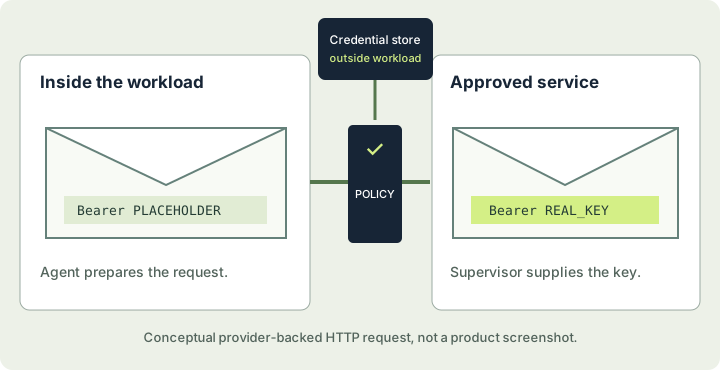
Provider-backed access solves a specific problem: the agent can authenticate to a service without receiving the real credential as ordinary readable data. It sees a placeholder, and the supervisor substitutes the credential only where the profile or explicit binding permits it.
A permitted destination does not automatically become a permitted destination for a provider key. A credential-endpoint mismatch points to that binding. Repair it rather than widening the network rule and hoping the same key will find its way through.
This protection applies to credentials managed through that path. A real token in a file, an agent config, or sandbox create --env is still data the workload can read. Also, keeping a key outside the agent does not make every authenticated request harmless; the remote identity still needs appropriately narrow permissions.
Sources: provider profiles and plain environment variables.
For the incident-bundle example, the model key can stay in a provider. A future observability connection should use a separate read-scoped identity. Giving the model service access and giving a metrics API access are different capabilities, even if both travel over HTTPS.
Let the agent ask for more access
Eventually a legitimate request will hit a restriction. OpenShell can draft a narrow network-rule proposal from a denied connection. Its optional policy advisor also lets agents submit proposals. The advisor is off by default, and proposals normally wait for manual review.
openshell rule get my-agent --status pending
openshell rule approve my-agent --chunk-id <proposal-id>
openshell rule reject my-agent --chunk-id <proposal-id> \
  --reason "This investigation uses the uploaded incident bundle."
Replace the ID with the one shown in the pending proposal. Read the actual destination, calling executable, method, path, and risk findings before approving.
For the hypothetical investigation, a request to an unrelated upload service should remain denied. A request to the approved metrics endpoint might be appropriate, but only if the task needs current metrics and the data is suitable for that service. The fact that an agent asked for access is a starting point for review.
Automatic approval changes this decision. NVIDIA documents that a new public host without an applicable provider credential may pass the risk checks and be approved automatically. Manual review is the clearer starting point when your goal is to understand every destination the task uses.
Source: Policy Advisor, approval modes, and proposal risk checks.
What formal verification proves
OpenShell’s policy prover checks modeled permissions. A boundary check asks whether a candidate policy grants more than a maximum policy you supply. The proposal risk check asks a different question about newly introduced access.
Before running the check below, create and review boundary.yaml on the host. It must describe the maximum access you intend to allow. The first command saves the sandbox’s effective policy as candidate.yaml; the second compares it with that boundary.
openshell sandbox get my-agent --policy-only > candidate.yaml
openshell-prover check candidate.yaml --boundary boundary.yaml
The prover can return a counterexample when the candidate exceeds the boundary. Treat unsupported or inconclusive results as a check that did not pass.
The current boundary model covers filesystem, process, Landlock, L4 network, and REST features, with documented limits. Other protocols can return unsupported. A passing check does not verify the correctness of an agent’s plan, the absence of software vulnerabilities, or that a running sandbox enforces the intended policy.
Source: Policy Prover and coverage limits.
Use OpenShell for a real SRE task
Consider a hypothetical checkout service whose errors increased after a deployment. The first task is to compare the supplied logs and configuration, identify plausible causes, and propose the next diagnostic. It does not require the agent to restart the service.
Begin with the sanitized bundle and a model provider. Give the agent a concrete output contract:
Read incident-fixture/ and write incident-fixture/analysis.md.
Separate observations from hypotheses.
Cite the file and timestamp for each important observation.
Identify missing evidence and the next diagnostic that could resolve it.
Do not change infrastructure or contact additional services.
The prompt describes the job; the environment should make its limits true. An agent that cannot reach the cluster API cannot quietly convert this investigation into a production restart. Its report can still be wrong, so the reviewer checks whether the cited evidence supports the proposed cause.
After that workflow works, add a read-scoped observability API if fresh data changes the investigation. Test that the necessary read succeeds and that an attempted write is denied. Keep the remote account restricted as well, so a permissive local rule cannot silently grant administrative capability.
| Investigation step | Access to provide | Evidence of useful completion |
|---|---|---|
| Explain the copied incident | Incident files and one model provider. | The report cites relevant evidence and exposes gaps. |
| Check current service signals | Named read operations and a read-scoped service identity. | The actual query works; a forbidden operation is blocked. |
| Propose a code change | A writable copied repository and local test tools. | A reviewable diff and preserved test output. |
| Apply a production change | A separately reviewed workflow and narrowly scoped write. | Destination state and service behavior confirm the result. |
Each added capability should follow a concrete need in the task and a way to check the result. Intelligence alone cannot supply permission; the consequence of the operation determines what must surround it.
OpenShell handles important parts of the access problem. Your service workflow still owns approvals for consequential actions, stale plans, retries, and recovery. If containment interrupts a write, establish what the destination accepted before resuming. Our OpenShell recovery guide develops that problem further.
Operate OpenShell beyond your laptop
A shared gateway becomes part of the infrastructure supporting your agents. It needs identity controls, persistent configuration, image management, and monitoring. Start with the workstation lab so you understand the expected traffic before moving it into a cluster.
Kubernetes must enforce the outer fence
For a shared cluster, NVIDIA’s current setup requires Kubernetes 1.29+ and Helm 3.x, the tool used to install the OpenShell chart. Install the Agent Sandbox controller and its custom resource definitions, or CRDs, first. The CRDs add the sandbox resource type to Kubernetes, and the controller creates its workload pods. The OpenShell chart uses that controller; it does not install it for you.
The cluster’s network plugin, or CNI, must enforce Kubernetes NetworkPolicy for both incoming and outgoing traffic in every sandbox namespace. Kubernetes can accept a policy object even when the network implementation does not enforce it. In that case, the workload may reach the network directly instead of through the supervisor.
For a cluster evaluation, verify that direct workload egress fails while the mediated approved request succeeds. A running pod and an accepted manifest cannot establish that distinction.
Source: Kubernetes installation and CNI requirements. Follow the complete release-specific setup for certificates, RBAC, and registration.
Monitor the work and its infrastructure
Gateway metrics describe the system supporting execution, while a synthetic task tells you whether an agent can perform the work you need. A useful check starts a sandbox, reads a fixture, contacts the approved model service, and returns a verifiable artifact. Use a fixture that contains no private data.
NVIDIA exposes Prometheus metrics for gateway requests, readiness, relay capacity, and other components. Scrape each replica for replica-local capacity. Its metrics endpoint uses unauthenticated plaintext HTTP, so restrict reachability to the monitoring system.
Source: gateway metrics.
Collect both policy logs and workload output. The gateway holds a bounded in-memory log buffer, and the push path can drop events. An agent’s stdout is also a different source from the supervisor’s policy decisions. Preserve both if the records will support incident reconstruction.
Source: log collection, retention, and loss awareness.
For a rollout, measure completed investigations, useful denied operations, accidental blocks, and human review time. These are proposed workflow measures, not native OpenShell metric names. They tell you whether the permissions support the task instead of merely producing a large count of denials.
Troubleshoot the layer that actually failed
“The agent could not do it” leaves several repairs open. A missing program belongs in the image, a denied destination in policy review, a mismatched credential in its binding. An upstream refusal may need no local access change. Find which layer answered before making the next run more powerful.
openshell status
openshell sandbox get my-agent
openshell policy list my-agent
openshell policy get my-agent --full
openshell logs my-agent --since 10m --source sandbox| What you see | What to check next |
|---|---|
| The CLI cannot reach a gateway. | Check the local service and selected gateway before changing sandbox policy. |
| The sandbox starts, but the command is missing. | Confirm the workload image actually contains the agent and required tools. |
| A connection is denied. | Compare the logged executable, destination, and port with the effective rule. |
An HTTP request returns policy_denied. | Check method, path, protocol, and enforcement. Identify the loaded revision. |
credential_endpoint_mismatch appears. | Check the provider profile or explicit credential binding. |
An MCP endpoint is Ready but the tool fails. | Inspect endpoint results and timestamps, then run the actual tool operation. |
| A new filesystem permission seems ignored. | Recreate the sandbox with the intended startup policy after saving needed output. |
Pay attention to interpreters. A Python script’s network activity may be attributed to the real Python executable, and a Node-based tool may need the Node path used by its image. Use the denial log rather than guessing from the command’s friendly name.
Network updates can reload in a running sandbox and close existing connections. Filesystem and process restrictions are startup controls. A successful policy submission also needs a loaded-revision check and a traffic test.
Sources: policy troubleshooting, binary matching, endpoint diagnostics, and static and dynamic controls.
Common questions about NVIDIA OpenShell
Do I need an NVIDIA GPU?
No GPU is needed for the Docker-backed agent and public API examples here. GPU access is optional when the workload itself needs GPU compute. Calling a hosted model service does not make local GPU execution necessary.
Is OpenShell a model or a coding assistant?
It is the runtime around the agent. You still supply an agent, its tools, and a model connection. The default minimal workload image does not install an agent for you.
Is this the Open-Shell Windows Start menu project?
No. This guide covers NVIDIA/OpenShell, the agent runtime. Check the repository owner when searching or installing.
Can OpenShell prevent prompt injection?
It can restrict the actions available to an agent influenced by hostile content. It does not establish that the model interpreted the content safely, that its answer is correct, or that misuse of an allowed API is impossible.
Does read-only access prevent data leakage?
No. A method preset limits which HTTP methods may be sent. Data can still travel in an allowed request, and an approved model service receives the content you send it. Data classification and narrow destinations remain necessary.
Can I run everything locally?
The agent environment can run locally. Where inference runs depends on your model configuration. The OpenRouter example sends model requests to a remote service; using a local model requires a separately configured route.
Can I use it with MCP tools?
OpenShell documents MCP request inspection and tool-name rules for supported HTTP transports. That does not establish safe tool arguments; current rules do not match tool arguments. Verify protocol versions and server-side permissions for your integration.
Is every policy formally verified?
The prover checks the features represented in its current model. Read the coverage and result; unsupported and inconclusive checks are not successful proofs. Runtime enforcement and model correctness are separate checks.
References for these answers: sandboxes and optional GPU resources, inference routing, request protocols and MCP limitations, and prover coverage.
Your first useful OpenShell session
Download the session checklist
The first useful session leaves a report from the copied bundle and logs of a permitted read and denied write. One shows what the agent made of its evidence; the other shows what the environment allowed. Those records make the next sandbox easier to design.
Add access when a specific next task needs it. Fresh metrics call for the relevant read and a test. A production change calls for a separate workflow that checks the destination and recovers from an uncertain result. The first session gives those choices something concrete to build on.
Sources and version notes
This walkthrough deliberately pins OpenShell v0.1.4 and links its versioned documentation, rechecked on October 29, 2026. Newer releases exist. The v0.1.4 sandbox overview documents creation-time uploads with a trailing main command. Check your installed release and command help before applying options from a newer release. The commands below were reviewed against the documentation; they were not executed as a product test.
The incident investigation, Dockerfile adaptation, request explorer, and workflow measures are constructed teaching examples. No production incident, firsthand OpenShell deployment, benchmark result, or completed local command execution is claimed.
- NVIDIA/OpenShell repository and Apache 2.0 license.
- NVIDIA runtime introduction and setup video.
- Architecture and enforcement boundaries.
- Installation and support matrix.
- First-agent walkthrough.
- First network policy and request-rule semantics.
- Default policy and policy management.
- Provider profiles and Pi tutorial.
- Sandbox lifecycle, uploads, and downloads.
- Policy Advisor and Policy Prover.
- Kubernetes setup.
- Logs and metrics.
- Security best practices.
- Inference routing.
Source context
Source links appear within this article. Read them alongside the author’s analysis and evaluate the guidance against your environment.
Report an error or outdated detail