
On this page8 sections
Imagine a writer using a local AI assistant to work through an unfinished manuscript and a folder of private notes. The appeal is straightforward: ask questions about the material without sending the conversation to a model provider. Later, the writer adds web research and a convenient way to read scanned pages. The model stays on the laptop, but the workflow has acquired new destinations.
An engineering team building a search assistant for internal service manuals faces the same question. The chat model may run on a company server while another service extracts text from uploaded documents. Both setups can reasonably include local inference. Neither description, on its own, tells you where every piece of information goes.
Local AI gives people useful control over their work. Understanding the whole setup makes that control more deliberate: which material stays on the chosen machine, which features need a connection, and which copies remain afterward. The examples here are illustrative, not reports of a tested installation or a particular product leaking data.
Start with what local inference actually gives you
Inference is the computation that produces a response from a trained model. The model's weights are the numerical values learned during training; a runtime loads them and performs the calculations. When that runtime and model run on your laptop, a prompt can be processed there rather than sent to a hosted inference service. Our model inference guide explains that process in more detail.
That can be enough for a useful private writing workflow. Download the necessary model beforehand, use an application that processes the conversation locally, and work without depending on a remote model for every answer. LM Studio documents offline chat, local serving and local document processing with downloaded models. Its separate model discovery, download and update functions use the network. LM Studio offline operation.
The word local can describe several different arrangements:
| Arrangement | Where the model runs | What still needs explaining |
|---|---|---|
| Desktop application with a downloaded model | Your computer | Document processing, plugins, history and background connections |
| Desktop client connected to a local runtime | Your computer, through a separate service | Both the client and the runtime, including their selected providers |
| Team application with a self-hosted model | An organization-controlled server | The trip to that server, other connected services and administrator access |
| Network-isolated deployment | Inside an environment with restricted connections | Which processes the restriction covers, and how files enter, leave and persist |
Even a local address describes only the first stop. Ollama's API documentation says a local Ollama server can also access cloud models after sign-in. Seeing localhost in a configuration therefore does not establish where the requested model ultimately runs. The selected model and provider matter too. Ollama API introduction.
For the writer, the useful starting point is a specific arrangement: this app, this downloaded model, these document features. For a team, it includes the server and the services that server calls. A label on the model cannot answer for all of them.
A document can leave before the chat model sees it
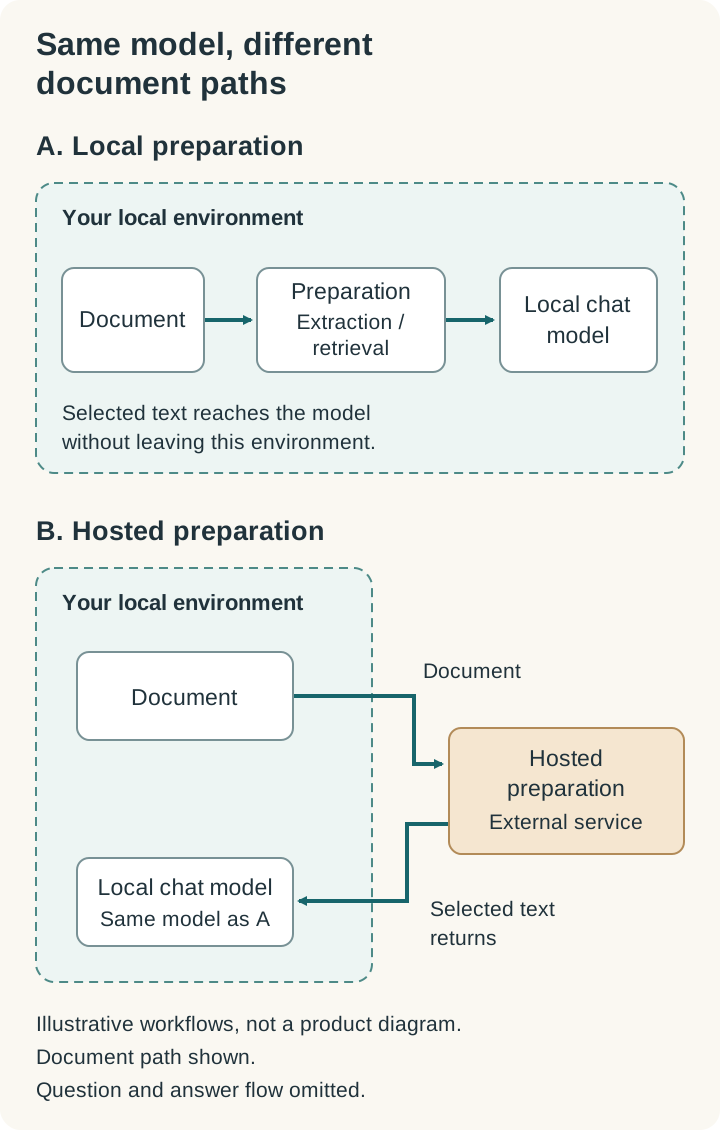
Asking questions about a long document often involves preparation. An application extracts text, divides it into smaller passages and finds the passages relevant to your question. It may use an embedding model to turn text into numerical representations that help match related meaning. The selected text then accompanies the question sent to the chat model. This is a common form of retrieval-augmented generation, or RAG. Ollama's embeddings documentation describes the representation and search step.
Each of those jobs has a location. A local chat model can receive text that a hosted extraction service prepared. A remote embedding service must receive the text it is asked to represent. Choosing a local model for the final answer does not move those earlier steps onto the same machine.
Consider the writer's scanned notes. A scan is an image, so the application may first use optical character recognition, or OCR, to recover its words. If the selected OCR service is remote, the page can travel to that service before the writer asks the first question. If extraction and retrieval are local instead, that document path can stay on the computer. The choice may affect convenience, language support and recognition quality as well as privacy.
This distinction applies to family records, work PDFs and voice notes as readily as to an engineering knowledge base. A voice feature may transcribe audio before the chat model receives text; its transcription setting deserves its own look. Open WebUI's official offline tutorial walks through the dependencies needed for local operation, including document and speech processing. It is a community-contributed deployment guide, so pair it with the configuration documentation for the installed release. Open WebUI offline guide.
A useful document setup therefore names the extraction, embedding and storage services, not only the model that writes the answer. This also helps when something breaks: a failed upload may belong to the document processor even while ordinary local chat continues to work.
Tools give a local model a way to act elsewhere
A local model can propose a web search, a file read or an action in another application. The model produces a tool request; software around it decides whether to execute that request, supplies any required access and returns the result. Ollama's tool-calling guide shows those as distinct steps.
For the writer, research might mean sending a search engine a question about a public historical date. It need not mean sending the unpublished chapter surrounding that question. A useful tool integration can limit the information it accepts. The difference is in the actual request the application makes, not in whether the model's calculations happen locally.
MCP, the Model Context Protocol, is one way applications connect to tools and information sources. An MCP server is a program providing those capabilities; it can run on the same computer or on a remote service. The protocol's architecture documentation distinguishes those locations. A server running locally may itself use the internet to perform its work.
LM Studio documents MCP hosting from version 0.3.17 and support for both local and remote servers from 0.3.17 build 10. Its guidance also warns that servers can have access to files, code execution and the network. Adding one changes what the application can do, even if you never change the selected model. LM Studio MCP support.
For an operations assistant, a deployment-status lookup might need a service name and return a version and timestamp. Giving it a general terminal with access to the entire home directory is a much broader arrangement. Filesystem permissions, tool credentials and network restrictions should match the intended job. A browser tool also needs attention to the accounts available in its session; a signed-in browser is different from a browser used only to read public pages.
Read-only access helps prevent changes, but it still allows information to be read and returned. An assistant that can read a private folder and call an external service has two capabilities whose combination deserves consideration. Keep secrets and unrelated documents outside the tool's accessible scope rather than relying on a sentence asking the model to ignore them. The MCP project's security guidance recommends restricting local server privileges and access.
There is another reason to separate those controls from the model: documents and web pages can contain instructions that try to redirect it. This is the indirect prompt-injection problem described by OWASP. Local inference changes where computation happens, not how trustworthy an outside page is. Enforced tool boundaries remain useful even when the model handles the page correctly most of the time.
Background traffic needs a different explanation
An application contacting the internet is not, by itself, proof that it uploaded your prompt. It may be checking for a release, downloading a model catalog, reporting a crash or carrying out a search you requested. Those connections have different purposes and potentially different contents.
LM Studio's offline documentation, for example, distinguishes local chat and document processing from model discovery, runtime downloads and application update checks. That separation lets you ask a more productive question than whether the app ever opens a connection: what activity caused this request, which component made it, and what information did it contain?
Telemetry settings also have a scope. In VS Code, setting telemetry.telemetryLevel to off disables VS Code's own telemetry going forward. Extensions may collect their own data separately, and other online features have separate controls. A local-model extension does not automatically inherit every privacy choice made in the editor. VS Code telemetry documentation.
Turning off unused reporting may fit your preferences. Turning off all updates indefinitely creates a different maintenance problem, since the application still needs fixes. An isolated team deployment can arrange controlled updates; an individual may prefer to reconnect deliberately for downloads. The goal is to understand those exchanges and choose them, rather than assume that every connection is either harmless or a leak.
The copy on disk matters too
Information can leave after the answer appears. Imagine the writer exporting a conversation to a folder already synchronized to cloud storage. The model performed its work locally, but another application now copies the export elsewhere. Nothing about the inference setting overrides that folder's sync behavior.
Chat history, uploaded files, retrieval indexes, logs and backups are separate places to consider. They can retain different portions of a task for different lengths of time. Deleting a chat should not be assumed to delete an exported file or an independently retained backup.
For a shared service, this becomes an operating question as well as an individual preference. Who can access the data directory? Which logs are collected centrally? Where are backups stored, and when do they expire? Open WebUI's hardening guide identifies its data directory as holding the database, uploaded files and cached plugins, and calls for appropriate filesystem permissions and backup handling. Open WebUI storage guidance.
Encryption and access controls can protect stored copies, but they need to match the people and processes allowed to use them. A self-hosted server brings those decisions under the operator's control; it does not make the decisions disappear.
Settings that make a real difference
Start with the routes your workflow actually uses. If you want the writer's manuscript assistant to stay local, local inference alone is incomplete when document preparation or tools are still configured for hosted services. If you want approved web research, you may deliberately retain that connection while keeping the manuscript out of its requests.
In Ollama, the documented cloud-disable options are OLLAMA_NO_CLOUD=1 or disable_ollama_cloud: true in ~/.ollama/server.json. The FAQ calls for a restart and identifies Ollama cloud disabled: true in the logs as the confirmation. Check the documentation against your installed version. This setting controls Ollama's cloud features, not every application on the computer. Ollama FAQ.
In Open WebUI, OFFLINE_MODE=true suppresses certain automatic network activities. It does not block configured external model APIs, search, tool servers or storage. Network isolation must be enforced separately when that is the requirement. Its configuration reference, marked for v0.12.1 when checked, also distinguishes ordinary environment variables from database-persisted ConfigVar settings. For those persisted settings, editing a startup variable may not change the active value after the first launch. Inspect the current application setting rather than trusting an old deployment file. Offline-mode scope and configuration reference.
In LM Studio, keep its documented local chat and document workflow distinct from the MCP servers you add. A downloaded model does not make a remote tool local. Review the enabled servers and their permissions as part of the setup, not as an unrelated extension preference.
For any application, inspect provider selection and any documented routing or fallback behavior. A feature that uses a hosted service when local capacity is unavailable can be useful, but it changes the destination. Do not assume such a fallback exists in every product, or that it is disabled everywhere by one similarly named switch.
The software you install matters too. Model weights, runtime software and custom model code are different things to trust. Hugging Face's Transformers guidance recommends extra care with custom modeling code and pinning a specific revision; it also explains its preference for the safer safetensors weight format when available. A recognizable model name does not review the code surrounding it. Hugging Face model-loading guidance.
Check the workflow without giving it a secret
You can learn a great deal before opening a sensitive document. Record the application and runtime versions, selected model and provider, document-processing services, enabled tools, and the location of saved conversations. On a team service, include the backend configuration. A browser's settings screen may show only part of the system.
If you already use Ollama on its default local port, these optional read-only requests inspect its version and currently loaded models. They assume curl in a Bash-compatible shell and an already-running server:
curl -q --noproxy '*' --fail --silent --show-error --max-time 5 http://127.0.0.1:11434/api/version
curl -q --noproxy '*' --fail --silent --show-error --max-time 5 http://127.0.0.1:11434/api/ps
These commands do not submit a prompt, download a model or change settings. -q avoids loading a default curl configuration, the proxy option keeps these requests direct, and the timeout prevents an indefinite wait. The endpoints are documented in the Ollama API reference and running-models reference; the options are described in the curl manual. A response tells you about that runtime, not every other process or destination in the workflow.
Next, use an invented document containing something recognizable, such as “The practice maintenance window starts at 09:15.” Try the features you actually plan to use: attach it, ask a question, export the answer, and, if relevant, use voice or search. Do not use real credentials or private records to discover where a feature sends information.
With the necessary models and dependencies already available, trying the same task disconnected can reveal a dependency you missed. Successful offline use shows that this task could finish under those conditions. It does not establish that the application never contacts a service when connected, that every feature works offline, or that data cannot be sent later.
Network observation has limits too. Chrome's Network panel covers the inspected page's requests; it does not automatically show calls made by a separate backend. Encrypted traffic can reveal a destination without revealing the content. Chrome's network-inspection guide explains the page-level tool. Teams with stricter requirements should enforce and verify outbound-network policy across the actual application environment, including tools, rather than treating one quiet browser tab as proof of isolation.
Choose how connected this assistant should be
There are good reasons to choose different arrangements. An individual may want a downloaded model for private notes and accept slower responses or less capable hardware. A team may prefer a managed internal service so model updates, access and backups have clear owners. Another workflow may benefit from a hosted document processor or current web research, provided the material sent there is appropriate for that use.
The important choice is how much of the workflow to keep local and which connections to allow deliberately. That includes the model, the preparation of its input, its tools and the copies left behind. Each added capability should have a destination and a purpose you can explain.
Return to the writer adding scanned notes. The useful decision is no longer simply which model to download. It is whether those pages should be read on the laptop or by a selected outside service, whether research tools need any of their contents, and where the finished conversation will be saved. Local AI makes more of those choices possible. Understanding the whole setup lets you make them knowingly.
Documentation checked October 28, 2026 (UTC). Product behavior depends on release and configuration. This article explains documented capabilities and illustrative workflows; it does not report hands-on security testing or guarantee isolation.
Sources & context
Sources linked in this article. Read alongside the author’s analysis; a citation does not independently verify a publisher’s claims.
- LM Studio offline operationlmstudio.ai
- Ollama API introductiondocs.ollama.com
- Ollama's embeddings documentationdocs.ollama.com
- Open WebUI offline guidedocs.openwebui.com
- tool-calling guidedocs.ollama.com
- architecture documentationmodelcontextprotocol.io
- LM Studio MCP supportlmstudio.ai
- security guidancemodelcontextprotocol.io
- OWASPgenai.owasp.org
- VS Code telemetry documentationcode.visualstudio.com
- Open WebUI storage guidancedocs.openwebui.com
- Ollama FAQdocs.ollama.com
- Offline-mode scopedocs.openwebui.com
- configuration referencedocs.openwebui.com
- Hugging Face model-loading guidancehuggingface.co
- Ollama API referencegithub.com
- running-models referencedocs.ollama.com
- curl manualcurl.se
- Chrome's network-inspection guidedeveloper.chrome.com