

On this page3 sections
Google lists Nano Banana 2.1 as generally available from October 6, 2026, under the model ID gemini-nano-banana-2.1. It generates and edits images, but setting seed, topK, logprobs, temperature or topP returns an API error. Google's model documentation
The migration looks like a one-line change until the first thumbnail job fails. A shared client can attach generation settings after the application has assembled its prompt, so changing the model name may leave an incompatible request intact. The worker stays alive, the queue keeps moving and the editor still has no image. That is the path worth following.
This is a migration guide for an existing image service, rather than a tour of everything the model can draw. We will follow one thumbnail job from the editor’s brief through the request helper to the delivered file. That path reveals why changing a model name can require changes to request construction and error handling even when the rest of the application stays familiar.
A shared default can become an incompatible field
Consider a hypothetical thumbnail service. An editor submits a product brief, a queue gives the job to a worker, and the worker turns the brief into an image prompt. Its shared generation helper attaches a temperature setting to every model request. An engineer updates the model selection but leaves the helper alone. In this design, the outgoing request still contains the unsupported field, so generation returns an error instead of a thumbnail. This is an illustrative integration failure, not a test or incident observed for this article.
Rewriting the image prompt will not remove a field inserted afterward. Neither will sending the same job back through the queue. The helper will add the same setting on the next attempt, producing the same mismatch. Looking at the final request gives the investigation a much shorter route than trying to persuade the model with different words.
Inspect the serialized request after application defaults and middleware have been applied, with credentials and private prompt content excluded from diagnostic records. Comparing that request with the model's documented capabilities exposes a problem a prompt-only test would miss. Keep the model ID and the application's configuration version with the error so a responder can locate the code that assembled it.
A small model-specific adapter gives that difference a home in the code. The queue can still hand a job to the worker and the worker can still store the returned image, while the adapter builds a request this particular model understands. Instead of passing a shared bag of settings through unchanged, it selects the permitted fields deliberately. The next engineer can then inspect one place to see why this model receives a different request.
Some settings express a requirement, however. If a caller depends on a seed-based control for its evaluation workflow, silently removing that field changes what the application promises. The migration then needs another acceptable evaluation method or a model that supports the required control. Making the request acceptable cannot establish that the original requirement has been met.
The returned error determines the next attempt
Request incompatibility and scarce capacity require different responses. Google's general error guide associates 400 with validation or precondition failures, including access-policy issues, and 429 with resource exhaustion such as quota or shared capacity. The model page does not specify the exact code returned for each rejected field. Google's API error guide
For the thumbnail worker, record the actual status and message before choosing a response. When they establish that the configuration is invalid, another identical request leaves the cause untouched. Keep the job in a failed state that the application can explain, correct the adapter, and resubmit under the corrected configuration. A temporary capacity response may justify a bounded retry with backoff, while preserving the editor's deadline and the job's identity.
Watch the queue as well as the error. If every failed request immediately comes back for another try, one incompatible field can keep the worker busy without producing a single thumbnail. Count attempts separately from completed jobs so that activity cannot masquerade as progress. Once the adapter is corrected, the original job identifier lets the team connect the eventual image to the failure it replaced.
There is also a capability check above individual fields. Google's page lists structured output, function calling and Chat Completions as unsupported. A wrapper that requires one of those features needs a supported integration path; removing a sampling setting alone cannot supply it. This is a limit on this model's interface, not a restriction on the surrounding application's own queue, tools or storage code. Model capabilities
Follow the job through to a usable thumbnail
After the request is corrected, the migration still needs a result that can challenge its success claim. Our feedback-loop approach compares a change with an independent customer or workload signal, so an improvement cannot be created by hiding demand. For this service, keep submitted thumbnail jobs visible and check whether their output files can actually be retrieved. Excluding rejected jobs from the comparison would make the new path look healthier without giving those editors an image.
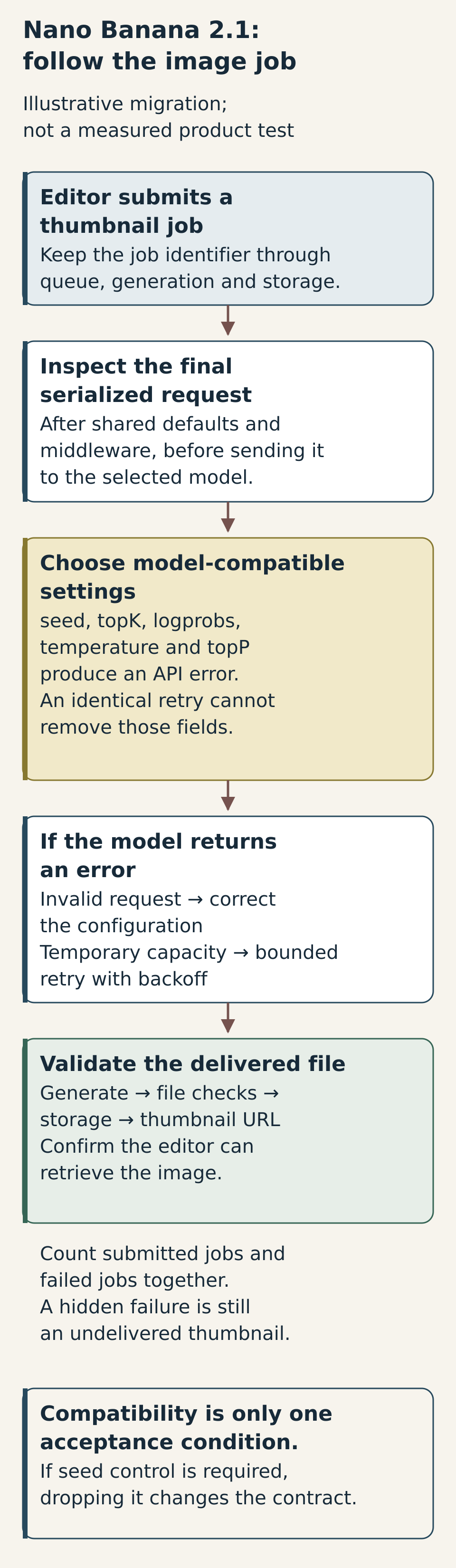
An API result and a delivered thumbnail are two milestones, with room for failure between them. The returned bytes still need to pass the service’s checks, reach storage and appear at the editor’s URL. Carry the job identifier through those steps. Then a missing image has a history you can follow instead of a reason to make another speculative generation call.
Read diagram description
Illustrative thumbnail service. Follow one job from its queue entry through the outgoing request, the generation attempt, file checks, storage and the editor's thumbnail URL. Carry the job identifier across those steps. It ends with retrieval and keeps failed jobs in the comparison. A control required by the application must be satisfied before the migration can meet that requirement.
For a small migration exercise, send representative thumbnail jobs through the same helper and delivery path the application will use. Preserve their final request configuration, errors, attempt counts and retrievable outputs. This does not require replacing the service's existing image-quality review: a file can be delivered correctly and still miss the product brief. Delivery checks and content review should retain their separate purposes.
Return to the editor waiting for a thumbnail. A meaningful migration test follows that job through the real request helper, keeps its failed attempts visible and ends with a retrievable image that meets the brief. Nano Banana 2.1 provides a new candidate for that workflow. The useful release result is knowing which part of the workflow must change to make the candidate work.
Source context
Source links appear within this article. Read them alongside the author’s analysis and evaluate the guidance against your environment.
Report an error or outdated detail