

On this page8 sections
The agent says the fix is ready. You open the file and find a different branch. When several sessions are running, locating the work can become its own small investigation. T3 Code puts conversations, terminal activity and changes in a free, open-source desktop, web or mobile interface. Agents such as Codex, Claude Code and OpenCode still do the work through your existing access. Official project
That shared view can make a finished patch easier to distinguish from a waiting approval or a task still running. A tiny repair gives us something concrete to follow from request to review, and a way to ask whether the interface helps.
This guide is grounded in v0.1.1 documentation, checked October 22, 2026. Installation and later development may differ. Match the release and downloads to the version you use.
The interface shows the repair; the agent makes it
Imagine typing “fix the empty-input result.” The selected agent reads the project, asks its model what to change and applies a patch through a file-editing tool. The file stays in the project folder. T3 Code shows the conversation, commands and diff, the comparison between the old and new file, so you can follow what happened.
| Part | Its responsibility |
|---|---|
| Model | Interprets the request and generates responses or proposed tool actions. |
| Coding agent, or harness | Supplies the working process, project context and tools to read, edit and run commands. |
| T3 Code | Organizes sessions, shows their work and lets you interact with the host machine. |
| Project checkout or Git worktree | Contains the files available for the agent to inspect and change. |
The division matters. The model proposes; the agent supplies the working loop and tools; T3 Code presents the session. A different interface does not, by itself, teach the model more or make its patch correct.
The application is free, but provider accounts, subscriptions, API charges and limits still apply. This release lists Codex, Claude, OpenCode, Cursor, Grok Build, Antigravity, Pi and Muse Code, with different setup requirements. Begin with one you already use and consult the provider instructions.
Check which machine holds the files
You can watch a laptop’s repair from a phone without putting the project on the phone. The laptop runs the T3 server process, the agent and its commands; the phone displays and directs that work. T3 calls the working setup an environment. The desktop app can supply both the display and a local server.
Connect instead to a Linux machine elsewhere and the relevant paths, agents and credentials are that machine’s. Installing a provider on your laptop does not install it on the remote host. Check which environment the session selected before asking it to open a file.
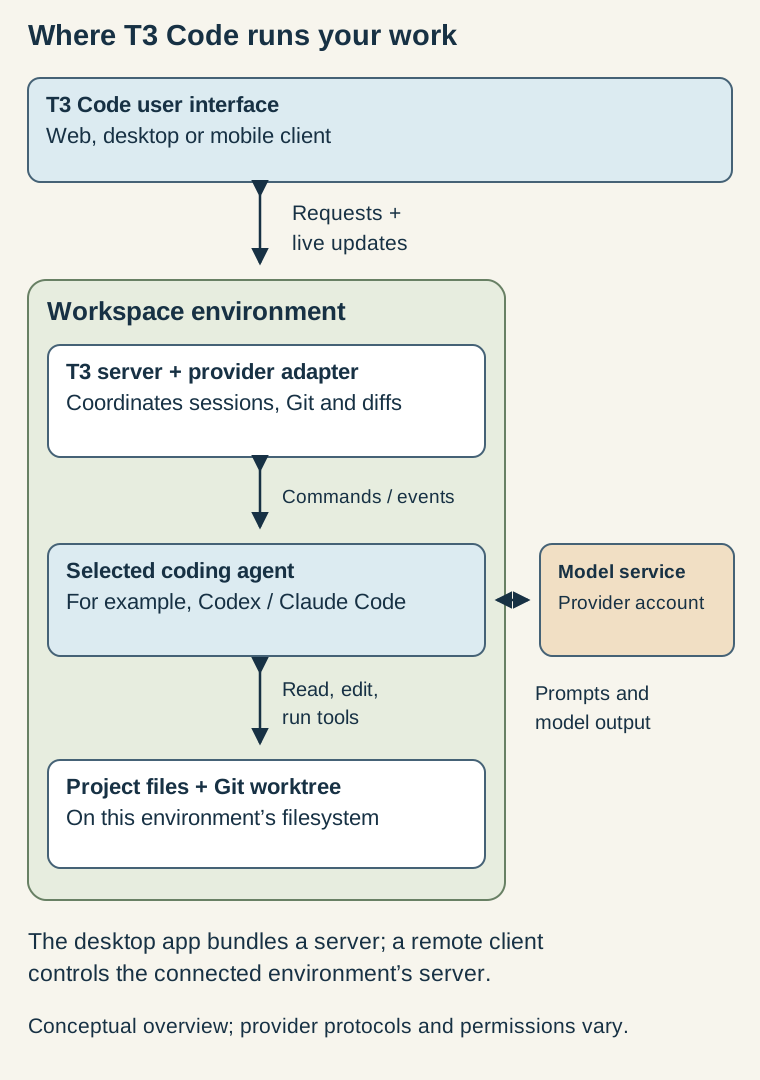
The phone is a way to reach the workstation, not a replacement for it. Files, tools and processes remain on the host. The remote-access guide explains the arrangement.
A second conversation is not a second working copy
A thread holds a task’s conversation. A Git branch names development history; a worktree gives that history a separate working directory. Two conversations can still edit the same files. Separate worktrees keep edits apart until you are ready to compare them.
Suppose one agent edits a deployment check and another edits its instructions. Separate working copies stop each agent from using the other’s half-finished changes. They do not settle whether the finished script and instructions agree. Someone still has to compare them.
Choose a new worktree, reuse an existing one or work in the checkout according to that need. Scratch conversations require no Git project, and a new thread does not automatically make a branch. See thread behavior.
A worktree separates source edits, not operating-system access. The agent still runs on its host and may reach network resources or credentials outside the folder as its permissions allow. Separate files are useful; they are not a security boundary.
Give the first repair a result you can recognize
For a first run, install the desktop release and choose a permitted provider. In the environment that will run the project, open Settings → Providers and follow that provider’s authentication instructions.
Before submitting the task, select Supervised. The documented initial default, Full access, allows commands and edits without prompts. Supervised asks about changes and commands while some reads proceed; behavior differs by provider. Read the actual request for approval rather than relying on the mode’s name. See modes.
Unpack the synthetic practice project: a README, checks.py and test_checks.py. Python 3 and Git are enough. The fixture needs no packages and makes no network requests.
The helper summarizes Boolean checks: True means a check passed; False means it failed.
def summarize_checks(checks):
    return "healthy" if all(checks) else "unhealthy"
An empty list exposes the mismatch. Python’s all returns True when no item is false, including when there are no items. Our application has a different question: did any checks establish health? For this exercise, no checks must produce unknown. That is a small requirement the agent should be able to explain without guessing.
| Checks supplied | Result the exercise requires |
|---|---|
[True, True] | healthy |
[True, False] | unhealthy |
[] | unknown |
Inside the unpacked directory, establish the Git baseline and run the tests:
git init
git add README.md checks.py test_checks.py
git commit -m "Add T3 Code practice project"
python3 -m unittest -v
Use python if that is your Python 3 command. Git needs its normal author identity. Expect five tests with one failure: the empty-input case. That failure is the intended starting point, not a reason to change the test.
Add the directory in T3 Code. Start a New worktree thread, select the configured agent and confirm Supervised. There is now a committed baseline, a separate working copy and a failure you can recognize.
First ask the agent to explain what it found:
Read the README, checks.py and test_checks.py. Explain why the empty-input test fails and identify the command that reproduces it. Do not edit files yet.
The explanation should connect all([]) to the incorrect healthy result. Then give it the bounded repair:
Change only checks.py so an empty list returns "unknown". Keep the tests unchanged. Run the test suite, report the exit status and show the diff.
Read each approval before accepting it. The fixture needs no installation, external service or hosting credentials, although the agent uses its provider connection. Checking for empty input before calling all is a plausible fix. Changing the expected test answer would discard the requirement instead.
Inspect the diff, then rerun python3 -m unittest -v from the thread’s worktree, adjusting the Python command if needed. The original folder deliberately remains broken. All five tests should pass in the repaired copy, and you should understand why. This demonstrates a review loop, not a production health-check design.
Review the whole change before sharing it
A turn-level diff shows the latest action; a broader comparison shows the full branch. A merge or pull may introduce changes outside the agent’s own turn edits. Inspect that broader view before deciding what to share.
The host’s access may also allow commits, pushes and pull requests. Decide those actions after reviewing the work. A real change needs the complete branch and service-relevant tests checked before publication. See source control.
A phone connects to the work; it does not move it
If local use proves helpful, T3 Connect can make the environment available on another device without router forwarding. On the host, open Settings → Connections, sign in and enable it. On the other device, use that account and choose the environment.
The phone still shows work running on the host. Closing that view need not stop the work; putting the host laptop to sleep changes the machine doing it. Explore the distinction with the small project before depending on a long remote task.
Direct pairing and SSH offer other routes. Treat pairing links and codes as credentials, and match the host, provider and access path to the policy for restricted code. See the remote options.
A new agent needs more than the last reply
Changing providers does more than change the label above a conversation. T3 Code’s portable handoff sends selected conversation history to the next provider.
A short history can transfer intact. A long one uses a budgeted selection of recent text, the original request and relevant activity. Outgoing reasoning, tool-call state and attachments are omitted. That matters if the next step depends on an earlier file or a command still in progress. See handoffs.
Picture the replacement agent opening this repair with no other context. It needs the empty-list requirement, the allowed files and the test command. Earlier conversation explains the decisions; current files establish what exists. Carry both so the next agent does not have to reconstruct the task.
Does the extra interface make the work easier to follow?
To judge the interface, first keep the agent and model the same, use similar tasks and permissions, and record configuration changes. How easily can you find the next decision, inspect the diff and finish? If the model changes along with the interface, credit belongs to the combined setup. The benchmark guide explains that distinction.
Someone comfortable with one terminal may gain little. Someone moving between projects, sessions and devices has more coordination for T3 Code to help with. Weigh that benefit against the maintenance and compatibility work of another early project.
The fixture is done when empty input returns unknown, the tests pass and you can explain the change. As branches and conversations multiply, T3 Code earns its place only if the path from request to file to command to result stays easier to follow.
Verification: The original article’s review covered T3 Code v0.1.1 documentation and official project materials on October 22, 2026. Its supplied Python fixture’s intentional failure and reference correction were run locally. T3 Code itself, provider authentication, remote access and an agent-driven repair were not exercised; this article claims no hands-on product or performance result.
Sources & context
Sources linked in this article. Read alongside the author’s analysis; a citation does not independently verify a publisher’s claims.
- T3 Code v0.1.1 releasegithub.com
- T3 Code: installgithub.com
- T3 Code: permission modesgithub.com
- T3 Code: thread sidebargithub.com
- T3 Code: remote accessgithub.com
- T3 Code: portable handoffsgithub.com
- T3 Code: source controlgithub.com