

On this page7 sections
OpenAI released GPT-6.1 Terra on October 26, 2026, with a fairly recognizable workday in mind: read a document, make sense of something on screen, write a useful response and do something with it. The company positions Terra around natural writing, visual reasoning and computer use, at lower standard API token prices than GPT-6.1 Sol. It is available through the API and is rolling out in ChatGPT Work and Codex. OpenAI’s announcement and dated developer announcement.
The interesting part is how those abilities meet. A customer update may begin as rough notes and a screenshot. A product record may need a description, a photograph and several fields entered into an application. These are ordinary jobs with several kinds of information, not just questions waiting for a clever paragraph. Terra is a new option for bringing those pieces together without using OpenAI’s most expensive model for every step.
This is a launch explainer based on OpenAI’s published material, not a hands-on performance test. The examples below are illustrative uses, not measured Terra results.
First, what exactly is Terra?
GPT-6.1 Terra is the model: the trained system that interprets the input and produces a response. ChatGPT Work and Codex are applications that can put that model to work with files, tools and connected software. The API lets developers build it into their own applications.
That distinction explains why choosing a model does not, by itself, give it access to your inbox or control of a computer. The surrounding application supplies information, exposes permitted tools and executes the actions the model requests. OpenAI’s function-calling guide describes that exchange. Our model inference guide follows what happens inside a model request in more detail.
Terra accepts text and images and produces text. Its API model page lists a 1,050,000-token context window and a maximum of 128,000 output tokens. Tokens are the units a model processes, including pieces of words; the context window is its working capacity for a request, not a promise that it will remember every detail equally well. Native audio and video are not supported. A tool-enabled application can still let Terra work in other media, but that is different from sending a video directly to this model. Model specifications.
Writing that starts with the material you already have
Much everyday writing is an act of translation: turning technical notes into a customer explanation, a meeting into a plan, or a long draft into something a busy colleague will actually read. Terra’s writing focus makes it a candidate for that work. OpenAI’s model-selection guidance specifically recommends considering it for concise writing grounded in supplied material.
Imagine a maintenance notice assembled from these notes: “Storage migration, Thursday 22:00–22:20 UTC. Reporting may pause. Purchases unaffected. Status page will carry progress.” A useful request would ask Terra to turn them into a short customer email, keep the time zone and affected feature explicit, and avoid promising an exact recovery time beyond the maintenance window.
The improvement you want is easy to describe. The customer should learn when the work happens, what they might notice and where to look for updates. The technical nouns can recede; the distinctions must survive. “Reporting may pause” cannot quietly become “the service will be unavailable,” and a planned window cannot become a guarantee. Those are concrete ways to judge the draft rather than deciding that the smoothest version wins.
The same approach works for a proposal, a project handoff or a personal message you have been putting off: supply the facts, the audience and the job the writing needs to do. For a team operating a service, that can make the communication around planned work less laborious. For a customer-facing team, it can help turn internal language into a useful answer. Neither requires treating the model as the source of the underlying facts.
Seeing the detail that text alone misses
Visual reasoning means working with the content and relationships in an image, not merely recognizing that an image contains a chart or a building. OpenAI names product-photo matching and interpretation of technical drawings among Terra’s intended uses. GPT-6 guidance.
Consider a catalog with two nearly identical parts. A written description might give the material and size but omit the position of a mounting hole. A photograph can supply that missing distinction. A useful assistant would compare the visible features against the candidate records and explain which feature separates them, leaving an unreadable part number unresolved rather than filling it in.
For an operations team, the equivalent might be two dashboard screenshots from before and after a deployment. The useful output identifies which series changed, the time range and the displayed units. If one chart is in milliseconds and the other in seconds, that detail changes the comparison. An image is also a snapshot: it can help explain what the screen showed when captured, but it cannot establish the service’s current state.
Image quality matters. OpenAI documents limitations involving small text, rotation, graph styles and precise spatial interpretation. Enlarging the relevant region or providing the underlying numbers may be more useful than asking the model to reason harder about a blurry screenshot. That is especially important when a visual impression is about to become a number in a report. Vision limitations.
From reading a screen to changing something in an app
Computer use adds a feedback loop. The model receives a view of the application, requests an action, and sees the resulting screen before choosing what comes next. The application around it performs the clicks, typing or other operations. OpenAI’s computer-use documentation describes both screenshot-based interaction and the runtime that carries it out.
Return to the maintenance notice. Drafting the text is one task. Placing it in the right service’s status-page editor, selecting the maintenance window and saving it as a draft is another. In an appropriately connected application, Terra could help with both. The second task requires the assistant to locate fields, preserve their meaning and respond to what the interface actually does. The desired result is a saved draft with the right service and time, not a message saying that the form was filled in.
This is why visual reasoning and computer use belong together. A screen provides clues about what actions are available and whether the last action worked. It also explains the appeal for software that people still operate by hand. The model can interpret an interface instead of requiring every useful operation to begin with a custom integration.
A direct API or existing connector can nevertheless be a better route when it exposes the exact operation you need. It lets the application request a named action and inspect structured results without interpreting a screen. Computer use expands the available routes; it does not make every established integration obsolete.
For consequential actions, keep the final commitment separate. Preparing that maintenance notice is a reasonable first task; publishing it to customers should follow the organization’s approval process. OpenAI recommends controls in the application and execution environment, including limiting access and requiring confirmation where appropriate. Instructions to “be careful” should not carry that whole responsibility. Computer-use safety guidance.
What the launch results do, and do not, tell us
OpenAI reports that Terra, at medium reasoning effort, scored 15 percentage points above GPT-5.6 Terra on Agents’ Last Exam, a benchmark of professional software tasks, at about one-third the estimated cost. It also reports task completion more than three times faster than GPT-6 Astra and GPT-6.1 Sol in that evaluation context. These are vendor-reported results under particular test conditions, not a promise that your presentation, browser task or code change will finish three times faster. Launch results.
There is encouraging progress on factuality too, although the test matters. OpenAI’s system-card addendum describes an evaluation built from conversations users had flagged for factual errors. It says Terra makes substantially fewer errors than GPT-6 Sol and performs on par with GPT-6.1 Sol in that evaluation. Those deliberately difficult examples do not measure the error rate of ordinary production traffic.
The same addendum makes clear that improved safeguards are not uniform success. In a test of respecting environmental warnings, Terra still sometimes found an alternative route that violated the restriction. The test ran without system-level controls and is not a production failure-rate estimate. For someone connecting the model to working software, the practical implication is to retain real access controls and approval steps even when the model’s behavior has improved.
The price, in dollars rather than slogans
At standard API rates, requests with no more than 272,000 input tokens use these text-token prices:
| Token category | GPT-6.1 Terra, per million tokens |
|---|---|
| Uncached input | $1.00 |
| Cached input read | $0.05 |
| Output | $5.00 |
Those input and output rates are half GPT-6.1 Sol’s corresponding standard rates. They describe token prices, not an automatic 50% reduction in the cost of completing every job. Models can use different numbers of tokens, and a workflow can involve several requests. Current API pricing.
For an illustrative text-only request with 20,000 uncached input tokens and 2,000 total billed output tokens, the calculation is:
(20,000 ÷ 1,000,000 × $1) + (2,000 ÷ 1,000,000 × $5) = $0.03.
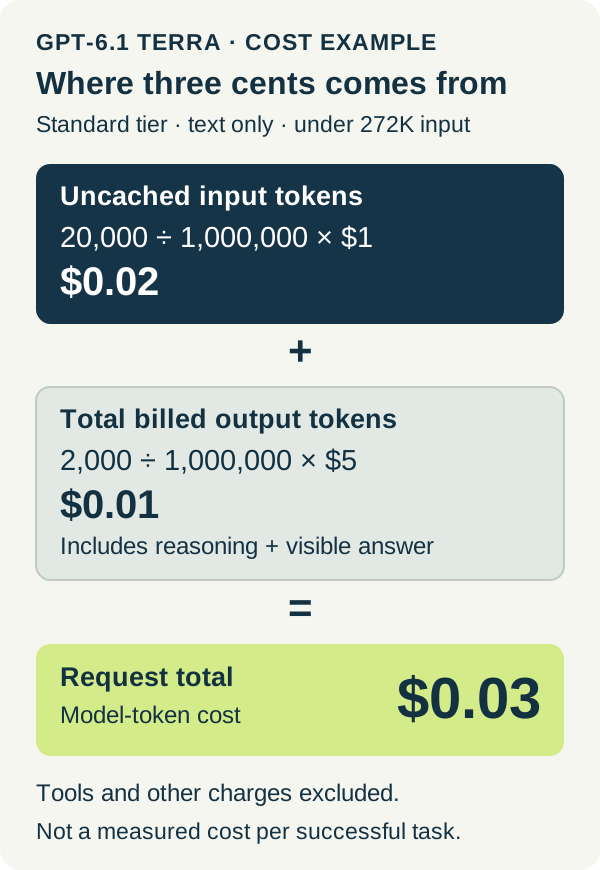
One thousand identical requests would therefore cost $30 in model tokens under those assumptions. This excludes tools and other charges; it is arithmetic, not a measured cost per successful task. Importantly, billed output includes reasoning tokens as well as visible answer tokens. A 2,000-token answer with additional reasoning would cost more than this example. Reasoning-token accounting.
Caching has its own detail. The $0.05 rate is for reading eligible cached input, not for every repeated-looking prompt. Standard cache writes cost $1.25 per million tokens with 30-minute retention or $2.50 with 12-hour retention. Above 272,000 input tokens, the full request uses double input and cache rates and 1.5 times the output rate. The large context window is useful capacity, but filling it changes the bill. Terra pricing conditions.
Where to use it, and when to choose Sol or Astra
The launch names Plus, Pro, Enterprise and Edu users for Terra in ChatGPT Work and Codex. That is a specific availability statement, not confirmation that the same model appears in every ordinary Chat mode or every client. OpenAI’s current model guide explains how to choose an available model through the application’s controls; options can vary with plan, client, workspace settings and rollout. Launch availability and model controls.
Developers use the identifier gpt-6.1-terra. Tool calling requires the Responses API. Reasoning effort supports none, low, medium, high, xhigh and max, with medium the API default. OpenAI recommends starting there and increasing effort when the improvement is worth the added time and tokens. GPT-6 guidance. ChatGPT subscription allowances and API charges are separate accounting systems; the three-cent example is not a way to calculate how many tasks a subscription includes. Plan usage and API pricing.
For developers, Terra’s territory includes scoped code fixes, interface work and applications that interpret visual material or produce drafts at volume. Sol remains a candidate for more complex projects where cost matters, while Astra is OpenAI’s strongest option for the most demanding reasoning and end-to-end work. Luna still occupies the lower-cost end for focused, repeatable tasks. These are starting points, not permanent job titles for the models. Model-selection guidance.
A familiar task makes the choice less abstract. Give Terra the maintenance notes and ask for the customer draft; ask it to explain a chart whose values you can read; let it prepare a record in a system where the result can be reopened. Then compare the useful result and the time spent reviewing it with your usual approach. A small model-token bill is most valuable when the work arrives in a form you can use.
Terra’s place in the lineup becomes clearer through that ordinary work. Sol and Astra can take the harder investigations and complicated projects. Terra offers another place to start for the writing, visual interpretation and application work that fills the space between them.
Sources & context
Sources linked in this article. Read alongside the author’s analysis; a citation does not independently verify a publisher’s claims.
- Launch resultsopenai.com
- Launch availabilitycommunity.openai.com
- function-calling guidedevelopers.openai.com
- Terra pricing conditionsdevelopers.openai.com
- Model-selection guidancedevelopers.openai.com
- GPT-6 guidancedevelopers.openai.com
- Vision limitationsdevelopers.openai.com
- computer-use documentationdevelopers.openai.com
- Computer-use safety guidancedevelopers.openai.com
- system-card addendumdeploymentsafety.openai.com
- OpenAI API pricingdevelopers.openai.com
- Reasoning-token accountingdevelopers.openai.com
- model controlslearn.chatgpt.com
- Plan usage and API pricinglearn.chatgpt.com