

On this page6 sections
An AI assistant can explain a deployment from the information you paste into a conversation. With the right connection, it can also retrieve the deployment record itself, read the service documentation and bring the two together. Model Context Protocol, usually shortened to MCP, standardizes that connection between an AI application and software outside it.
The useful change is reuse. A team can expose a system through an MCP server, and compatible AI applications can discover what that server offers without each integration inventing its own conversation with the system. MCP carries descriptions, requests and results. The application still chooses how to use them, and the underlying service still has to perform the work. The project's introduction describes this shared interface for data, tools and workflows.
That sounds abstract until you follow one question across it. Consider a hypothetical engineering assistant asked, “What changed in the catalog service this week?” The useful answer might need release records from one system and an explanation of configuration fields from another. MCP can make both available through a consistent interface, while leaving the records in the systems that own them.
Three pieces sit between the question and the record
The host is the AI application someone uses, such as an editor or an assistant. Inside it, an MCP client communicates with a particular MCP server, the program exposing a set of capabilities. A host can manage several clients, each reaching a different server. The server might run beside the application on a laptop or on a remote service. “Server” describes its role, not necessarily a separate machine. MCP's architecture guide sets out these relationships.
For the catalog question, one server could expose release records and another could provide service documentation. The host gathers relevant capabilities, arranges the model interaction and presents the answer. Each server deals with its own data or operations.
There are therefore two exchanges to keep straight. The host communicates with a model to interpret the question and decide what information would help. Its MCP client communicates with a server to obtain that information or request an operation. An MCP server does not have to be a language model, and connecting one does not train the model on the connected system.
That separation also explains a practical benefit: the team maintaining the release system can describe its operations once at the MCP boundary. A compatible editor and a compatible chat application can use that boundary while presenting quite different experiences to their users.
Tools, resources and prompts offer different kinds of help
MCP servers can provide three main building blocks. An implementation need not offer all three, and a particular host may expose them differently.
A tool is a callable operation. In the hypothetical release system, list_deployments might accept a service name and time range, then return matching records. A tool has a name and an input schema, which describes the arguments it accepts. It can retrieve data, calculate a result or change a system. “Tool” does not automatically mean a write. Clients discover available tools with tools/list and request execution with tools/call. The tools specification defines that interface.
A resource is context addressed by a URI, an identifier telling the client which item it wants. The service's configuration reference could be a resource. The host might let the reader select it or include it when relevant. A resource can contain text or other data; it need not be a file on the reader's computer. Listing resources and reading one are separate operations, just as finding a document in a catalog differs from opening its contents. The resources specification describes these exchanges.
A prompt is a reusable interaction template supplied by the server. A release-review prompt could organize a request around the selected service, changes and unanswered questions. It supplies a starting structure rather than a new trained capability. The project's server concepts guide explains how prompts, resources and tools complement one another.
For our assistant, the distinction is useful: the tool finds this week's deployments, the resource explains what a changed setting means, and the prompt can organize a review. They are three ways of helping with the same question, not three names for the same object.
Follow one complete request
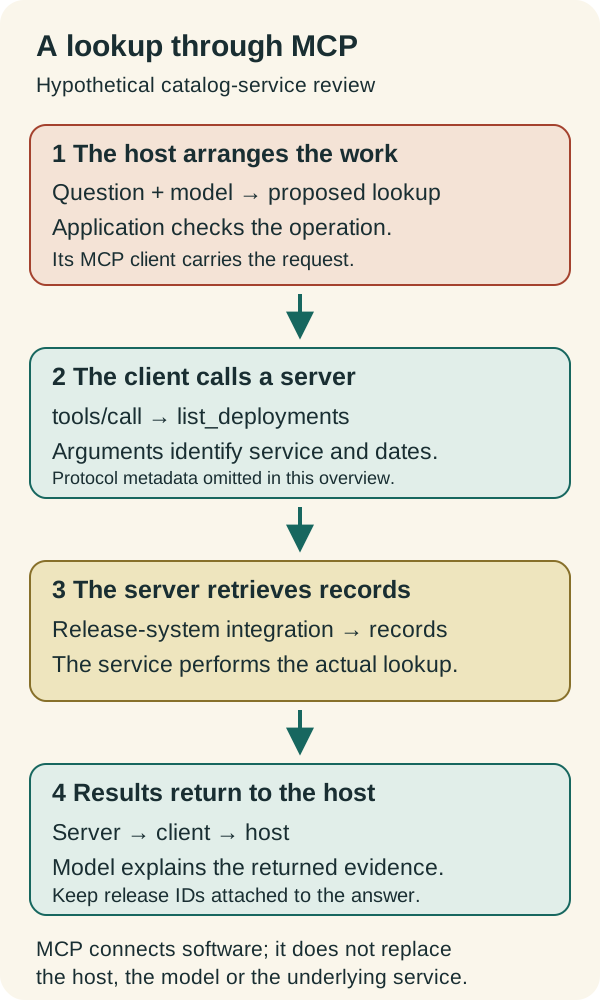
Suppose the release server advertises a tool with arguments for service, from and to. The host can make that description available to the model. After interpreting the question, the model proposes the catalog service and the relevant dates. The application checks the proposed operation against the user's request and its own controls, then its MCP client sends the tool request.
The server validates the arguments and uses its release-system integration to retrieve the records. Its reply travels back to the client. The host can then give the returned evidence to the model for explanation.
In this constructed example, imagine the result contains two release identifiers and their deployment times. The answer can now distinguish “the release system records two changes” from a guess based on the model's background knowledge. Reading the configuration resource can explain a setting in those releases, but neither record alone proves which version a particular running instance loaded.
This follows the separation of evidence, interpretation and execution in our agent handoff guide. Keep the returned identifiers and observations attached to the explanation. If the reader next asks for a change, the application has to evaluate that operation against the current target and permission; an earlier successful lookup does not settle it.
The model also does not need to choose every step. If the task is always “retrieve this service's releases for the previous calendar week,” fixed application logic can perform the lookup. Model assistance becomes more useful when the question is loosely expressed or the next useful lookup depends on what the first one returned. MCP can support the connection in either case.
Discovery tells you what the connection can do
The protocol version matters when reading setup examples. The current documentation describes revision 2026-07-28, which lets a client request a server's supported versions and capabilities with server/discover. That is separate from listing the actual tools, resources or prompts. Discovery can reveal, for example, that a server supports tools before the client asks which tools are available.
The current protocol carries version and relevant client capabilities with each request. The server must not infer a conversation's context merely from a reused connection. Application state that needs to persist across requests must be referenced explicitly. This is protocol statelessness, not a promise that the underlying release database forgets its records. The base specification makes that distinction.
Older examples may show an initialize handshake instead. That belongs to earlier protocol revisions; compatibility handling remains relevant to software supporting them. Match an example to the versions supported by both ends rather than combining pieces from different generations. This article explains the architecture, not an installation procedure or a tested client implementation.
Local and remote describe the route, not the reach
MCP's standard transports carry the same protocol ideas over different paths. With stdio, a client launches a server process and exchanges messages through its standard input and output streams. With Streamable HTTP, messages go to an HTTP endpoint and replies can arrive as ordinary JSON or a stream. The current transport specification describes both bindings.
A local server can be convenient for working with a development checkout. A remote server can make a centrally managed service available to multiple authorized clients. The important operational difference is where the adapter runs and how it reaches its dependencies.
Local placement alone does not keep all information on the laptop. A local server might call a cloud API, and the host might send returned text to a hosted model. To understand the data path, follow the server's dependencies and the host's model configuration as well as the MCP connection. Our local-AI privacy explainer follows that wider journey.
The connection still needs a suitable job
For protected HTTP servers, MCP defines an authorization framework based on OAuth. The server can enforce access using credentials and scopes, which describe permitted access. The specification distinguishes this from stdio credentials and recommends requesting the scopes needed for the intended operations. Authorization is part of the integration, not a consequence of seeing a tool's name.
That makes the catalog question a useful first boundary. A service-review assistant needs the records and documentation required to explain changes. A tool that can deploy or delete something is a separate capability with different consequences. Our automated-remediation method places permission at the action against the current target and requires evidence of the result.
The return path matters just as much. If a server supplies a release note containing instructions to send secrets elsewhere, that text is material retrieved for the task, not authority to expand it. Likewise, a tool description calling itself read-only is a claim to evaluate, not an access control. The MCP tools specification explicitly treats annotations from untrusted servers as untrusted.
MCP is most useful where several AI applications need a dependable way to reach the same systems, or one application needs capabilities from several systems. A small fixed job with an existing reliable API integration may not benefit from another adapter. The question is which connection makes the actual work easier to support.
For the catalog assistant, success is a clear account of this week's changes that a reader can trace to the release records and documentation. MCP makes those sources and operations available in a common language. The host turns them into an experience; the service performs the work; and the returned evidence gives the explanation something solid to stand on.
Source context
Source links appear within this article. Read them alongside the author’s analysis and evaluate the guidance against your environment.
Report an error or outdated detail